How to Deposit USDT on Obiex
Depositing USDT means sending USDT from another wallet or platform into your Obiex wallet.
There are two main ways to deposit crypto on Obiex V4:
1. On-chain deposit
2. Deposit via Obiex username
Method 1: Deposit USDT via On-Chain Transfer
This is the most common method for depositing crypto. You use it to send USDT from another crypto wallet (you own) on another exchange, or to receive USDT from a business partner, a friend, a giveaway, an airdrop, and so on.
Step 1: Log into Your Obiex Account
Open the Obiex app and sign in with your email and password or use the social sign-in option.
- If you don’t have an account yet, create an account here with your email address and complete your account setup to deposit funds.
Once logged in, you will directly land on the Obiex homepage.
Step 2: Go to the Wallet Section
At the bottom of the homepage, tap Wallet.
This section shows all the cryptocurrencies available and gives you access to important actions like:
- Deposit
- Withdraw
- Transaction history
All deposits start from this wallet page.
Step 3: Click on Deposit
Inside the wallet page, tap Deposit.
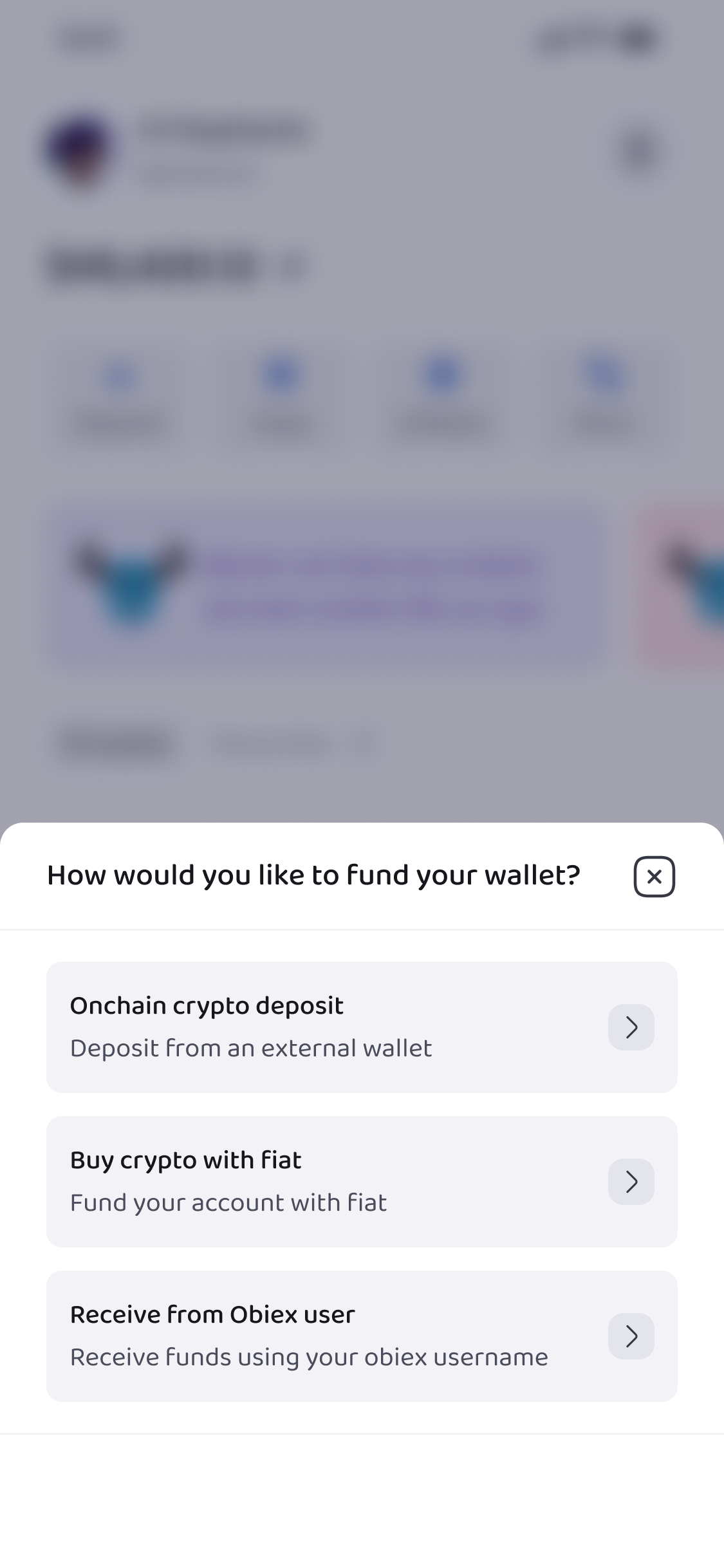
Obiex will now ask how you want to deposit funds. For this method, select the option for onchain crypto deposit.
Step 4: Select the Token
Next, choose the cryptocurrency you want to deposit.
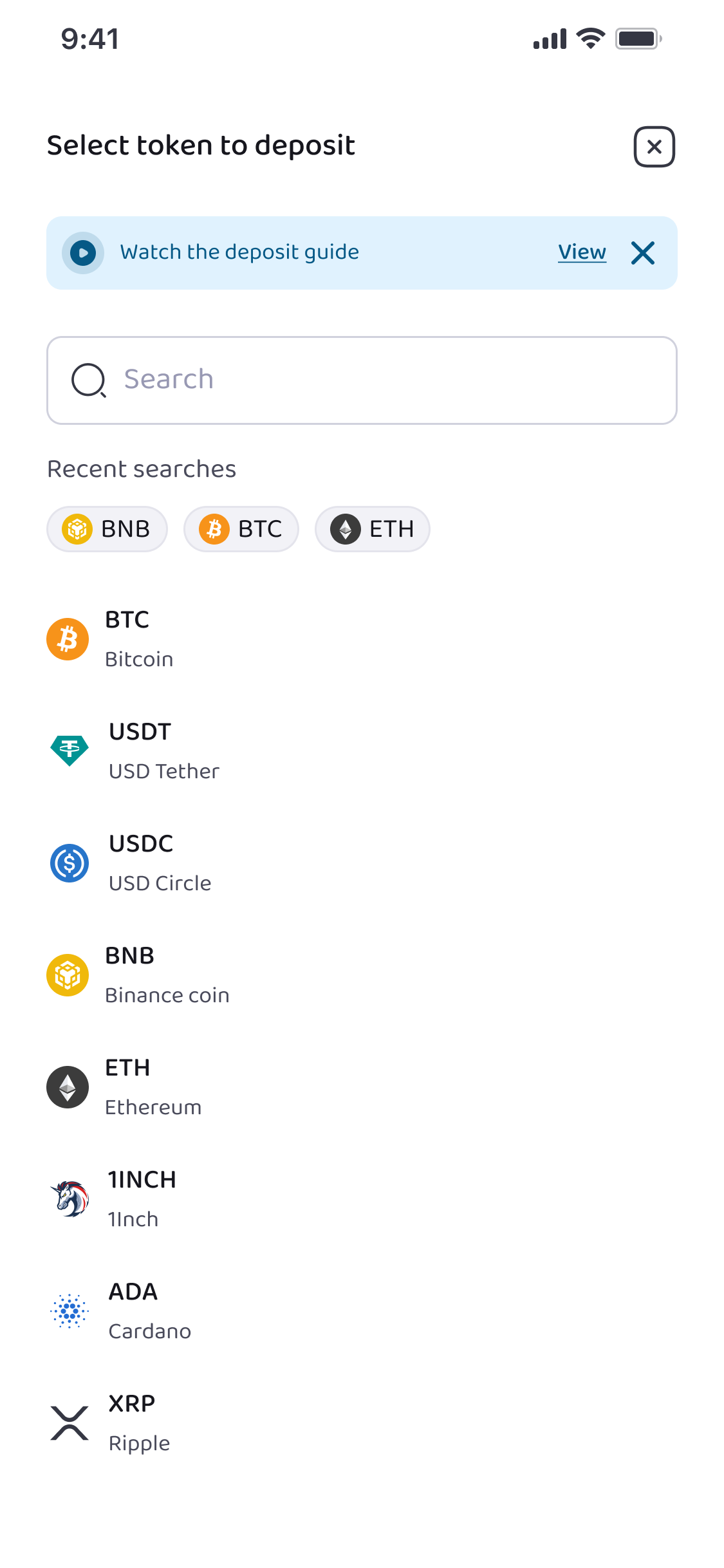
Since this guide focuses on USDT, select USDT from the list of available tokens.
Step 5: Select the Network
After selecting USDT, choose the deposit network.
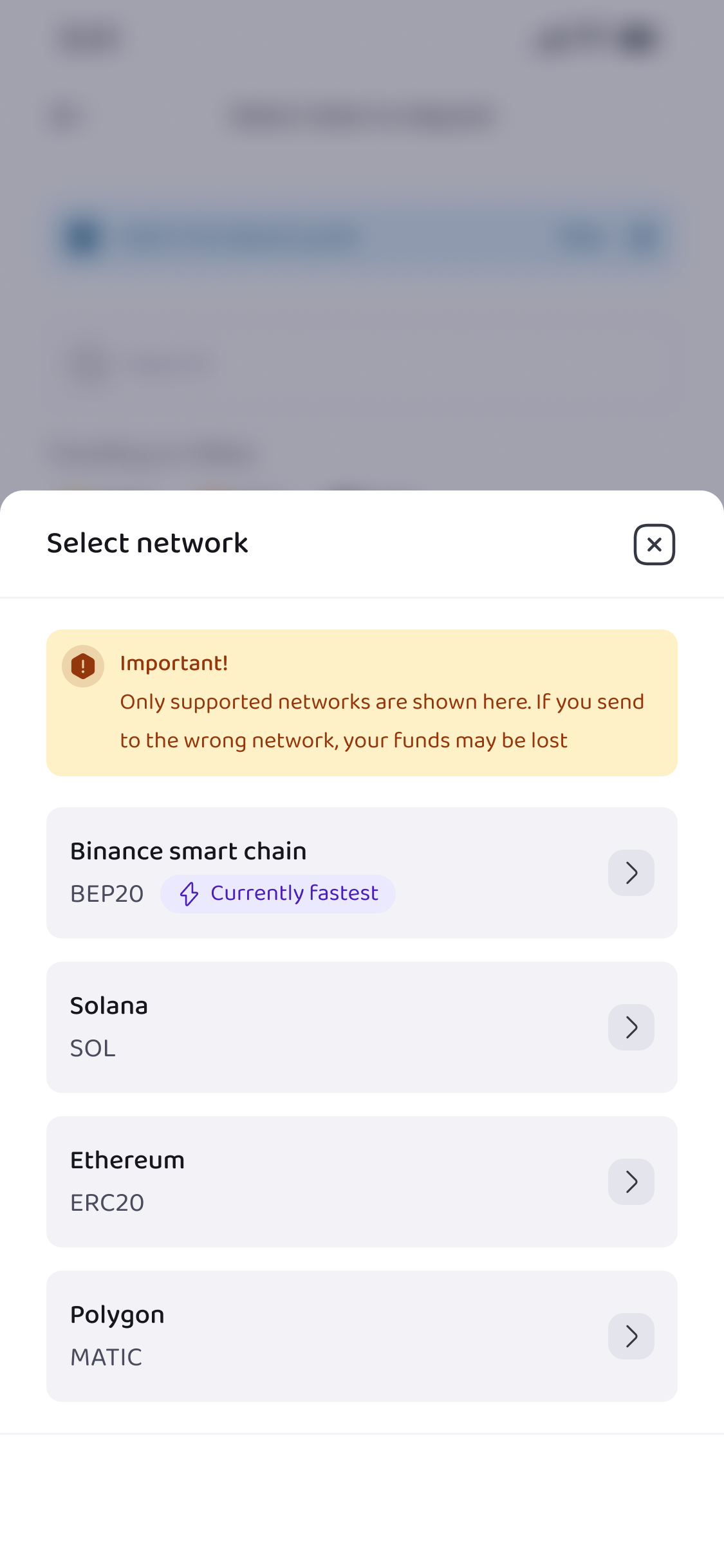
This is very important because USDT exists on several blockchain networks. On Obiex, we support:
- Tron (TRC20)
- Ethereum (ERC20)
- BSC (BEP20)
- Solana (SOL)
- Polygon (MATIC)
- Arbitrum One (ARBITRUM)
- Avax C-Chain (AVAXC)
Always make sure the network you choose on Obiex matches the network you are using to send the funds. If the networks do not match, the funds may not arrive.
Step 6: View Your Deposit Details
Once the token and network are selected, Obiex will generate your deposit details.
You will see:
- A wallet address
- A QR code
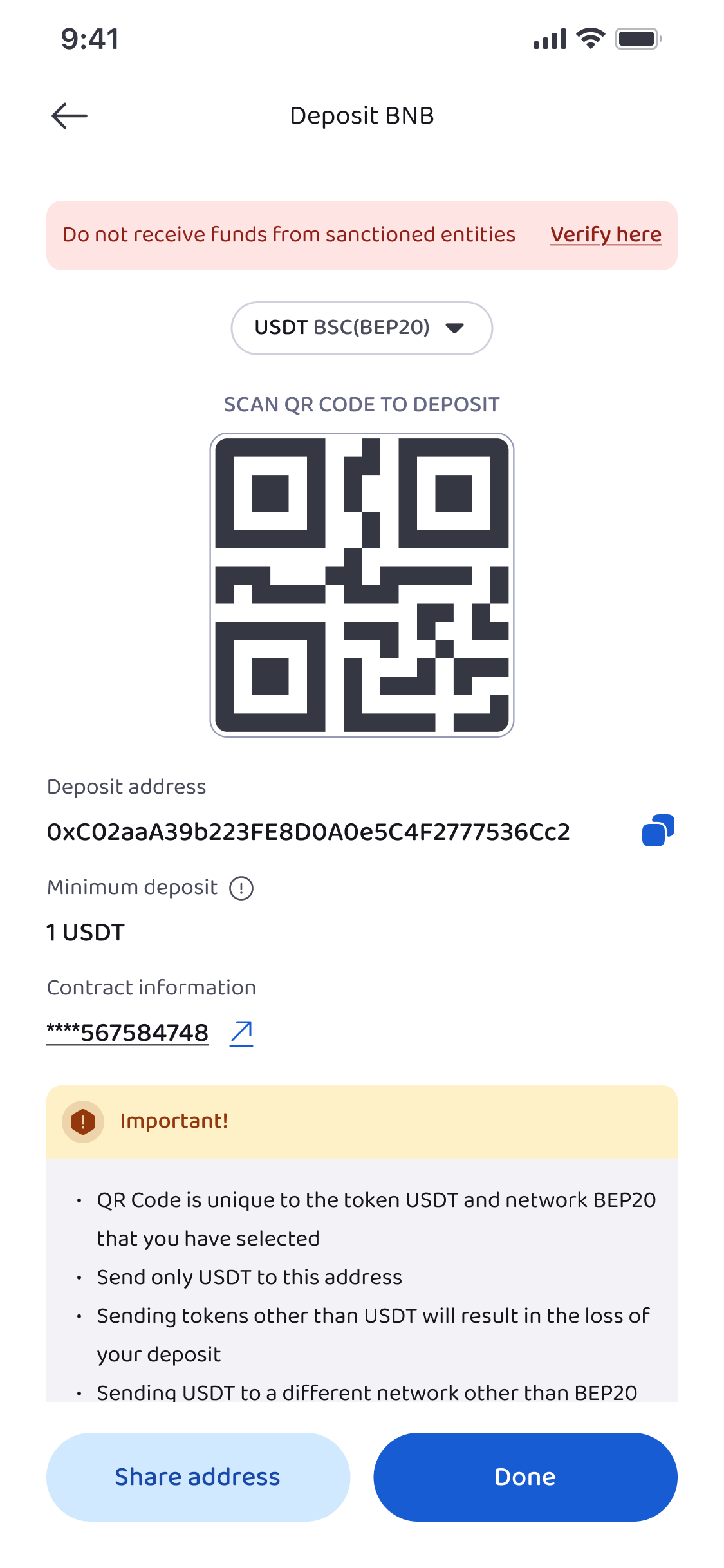
Both represent the same deposit destination.
You can either:
- Copy the wallet address and paste it into the sending walletor
- Scan the QR code using the wallet you are sending from
These details tell the blockchain where to send the USDT.
Step 7: Send USDT from the Other Wallet
Once you have copied your Obiex deposit address or scanned the QR code, the next step is to send the USDT to that address. There are two common ways this happens, depending on whether you are sending the funds yourself or someone else is sending the funds to you.
7a: Sending USDT To Yourself from Another Wallet
If the USDT is stored in another wallet or exchange that you control, you will need to initiate the transfer from that platform.
Open the wallet or exchange where your USDT is currently stored. Look for the Withdraw or Send option.
Next, paste the Obiex deposit address you copied earlier into the recipient address field. Then:
- Enter the amount of USDT you want to send.
- Confirm that the network matches the one you selected on Obiex.
- Review the transaction details carefully.
Once everything looks correct, confirm the transaction.
The sending platform will broadcast the transaction to the blockchain network. After the required network confirmations are completed, the USDT will appear in your Obiex wallet balance.
7b: Sending Your Deposit Address to Someone Who Wants to Send You USDT
Sometimes, you may not be the one sending the USDT. Instead, another person may want to send USDT to your Obiex wallet from their own wallet or exchange.
In this case, you simply need to share your Obiex deposit address with them by:
- Copying the wallet address and sending it to them through a message or email.
- Sharing the QR code, which they can scan directly from their wallet app.
The sender will then paste your wallet address into their Send or Withdraw section and complete the transfer from their wallet.
Once they send the USDT and the blockchain network confirms the transaction, the funds will automatically arrive in your Obiex wallet.
💡Tip: Always confirm the network, check the wallet address carefully, and start with a small test transaction if unsure.
Method 2: Deposit USDT via Obiex Username
If the person sending you USDT is also an Obiex user, there is an even easier option available.
Instead of using long wallet addresses, you can receive funds using your Obiex username.
This method is faster because the transfer happens inside the Obiex platform.
Step 1: Open the Wallet Section
Log into the Obiex app and tap Wallet at the bottom of the screen.
Step 2: Tap Deposit
Inside the wallet page, select Deposit.
Step 3: Choose Deposit via Username
Select the option to deposit using an Obiex username.
Step 4: Share Your Social Card
Obiex allows you to generate a social card that contains your username.
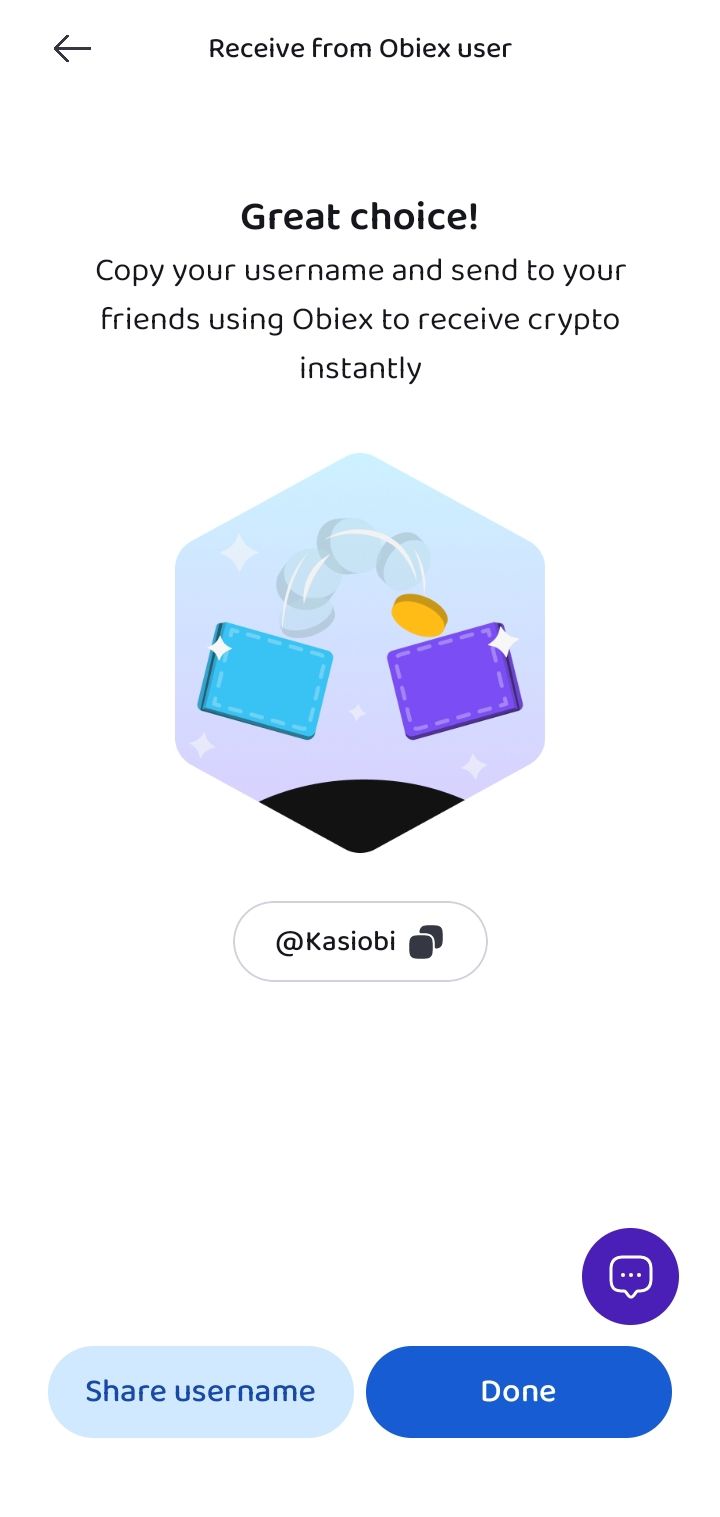
You can share this social card with the Obiex user sending you USDT. Once they have your username, they can send funds directly to your account.
This removes the need to copy wallet addresses or worry about blockchain networks.
Step 5: Receive the Funds
When the other user sends the USDT to your username, the funds will appear in your Obiex wallet.
Because this transfer happens inside the Obiex system, it is usually very fast.
How to Withdraw USDT on Obiex
Withdrawing USDT means sending USDT from your Obiex wallet to another wallet or user.
There are two main ways to deposit crypto on Obiex V4:
1. Withdraw USDT via On-Chain Transfer
2. Withdraw USDT via Obiex Username
Method 1: Withdraw USDT via On-Chain Transfer
This method is used to send USDT from your Obiex wallet to an external wallet or another crypto platform.
For example, you might withdraw USDT to:
- A personal crypto wallet
- Another crypto exchange
- A payment wallet that accepts USDT
Because this type of withdrawal happens on the blockchain, you will need the recipient’s wallet address and the correct network.
Step 1: Log into Your Obiex Account
Open the Obiex app and sign in using your account details.
Step 2: Go to the Wallet Section
At the bottom of the app homepage, tap Wallet.
This section displays your crypto balances and gives you access to actions like deposits and withdrawals.
Step 3: Tap Withdraw
Inside the wallet page, select Withdraw.
You will now see different withdrawal options available on the platform.
Step 4: Choose the Crypto Withdrawal Option
Select the onchain crypto withdrawal option.
Step 5: Select the Token
Next, choose USDT as the token you want to withdraw.
Step 6: Select the Network
After selecting USDT, you will need to choose the network for the withdrawal.
On Obiex, we support:
- Tron (TRC20)
- Ethereum (ERC20)
- BSC (BEP20)
- Solana (SOL)
- Polygon (MATIC)
- Arbitrum One (ARBITRUM)
- Avax C-Chain (AVAXC)
Please note: the network you select must match the network supported by the receiving wallet. If the networks do not match, the funds may not reach the destination.
Step 7: Enter the Withdrawal Details
Next, enter the required withdrawal information.
This includes:
- The recipient’s wallet address
- The amount of USDT you want to withdraw
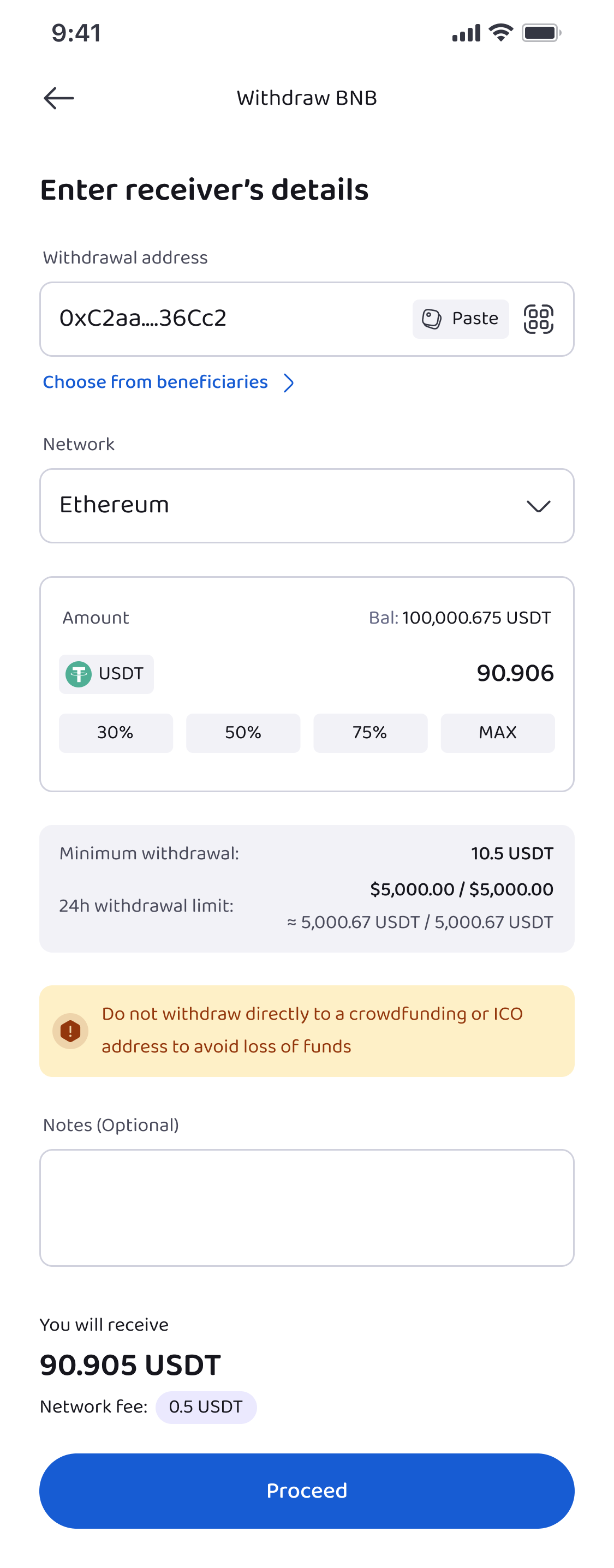
Always double-check the wallet address before continuing. Crypto transactions cannot be reversed once they are confirmed.
Step 8: Preview the Withdrawal
Before the transaction is processed, Obiex will show you a preview page.
This page displays important details such as:
- Token being sent
- Network selected
- Recipient address
- Withdrawal amount
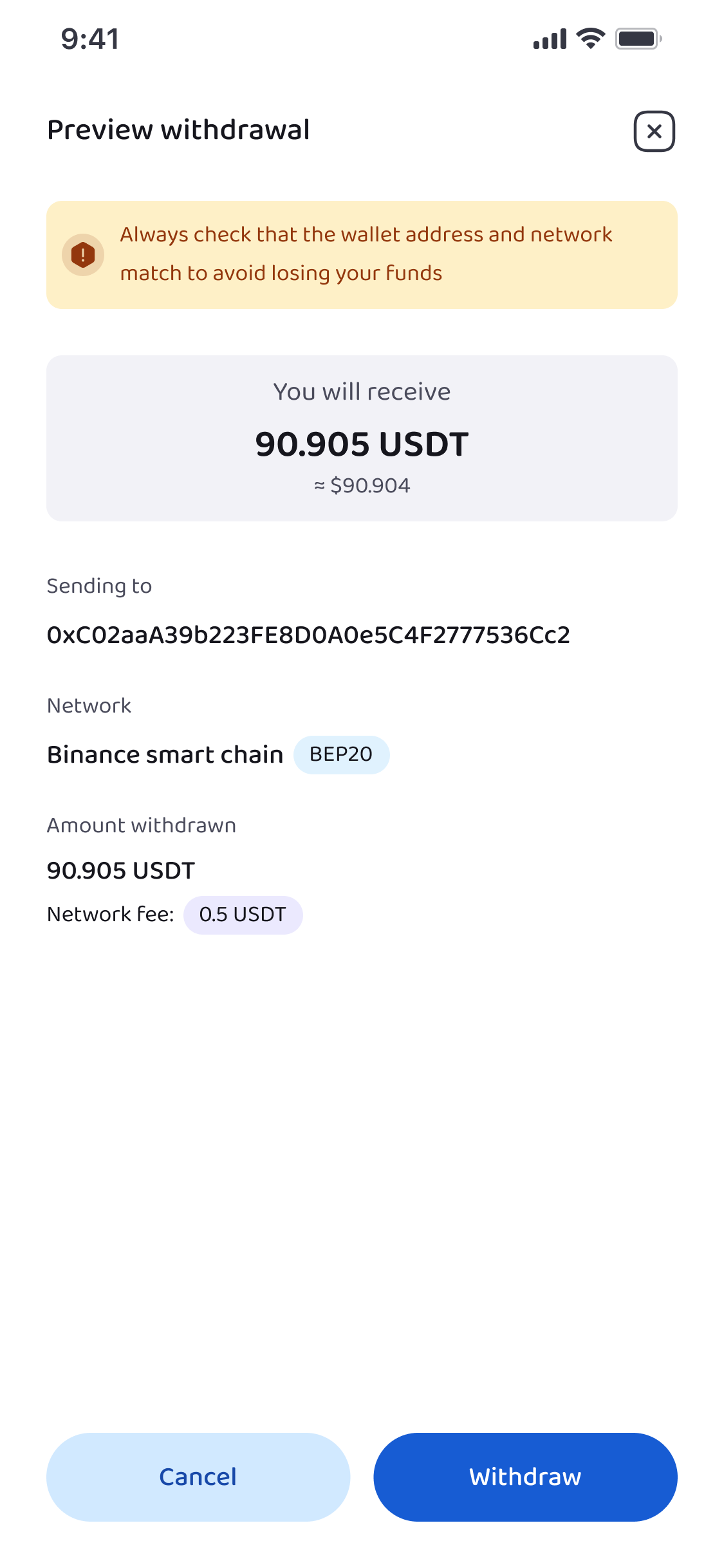
Take a moment to review everything carefully.
Step 9: Authenticate the Transaction
To keep your funds secure, Obiex requires authentication before completing a withdrawal.
You will need to confirm the transaction using:
- Your transaction PIN
- Two-Factor Authentication (2FA), if it is enabled on your account
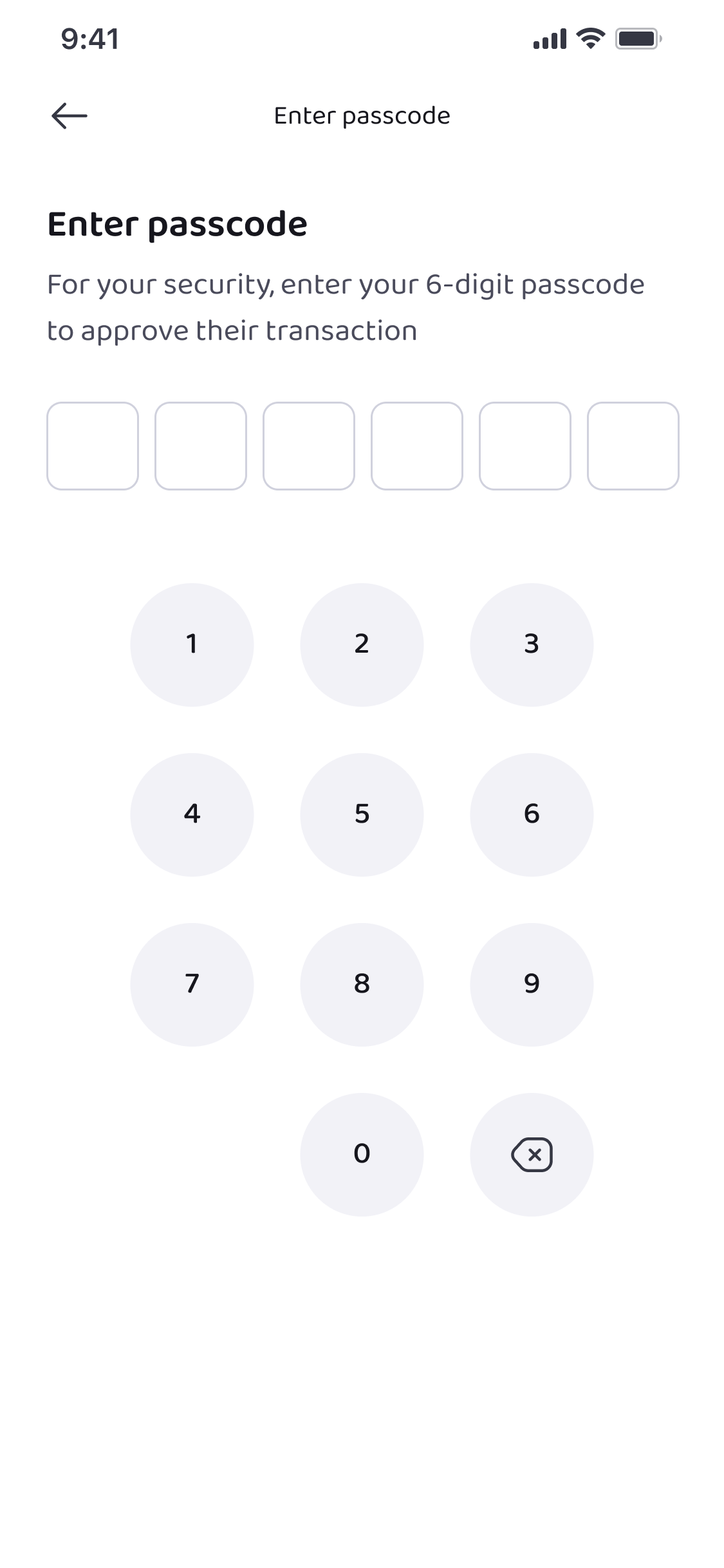
Once authentication is complete, the withdrawal request will be submitted to the blockchain network.
Step 10: Wait for Network Confirmation
After the transaction is processed, it will be broadcast to the blockchain network.
The time it takes for the funds to arrive depends on the network used, but most withdrawals are confirmed within a few minutes.
Once confirmed, the USDT will appear in the recipient’s wallet.
Method 2: Withdraw USDT via Obiex Username
If the person you are sending funds to also uses Obiex, there is an easier option available.
Instead of sending funds through the blockchain, you can transfer USDT directly to their Obiex username.
Step 1: Open the Wallet Section
Log into the Obiex app and tap Wallet.
Step 2: Tap Withdraw
Inside the wallet page, select Withdraw.
Step 3: Choose Transfer via Username
Select the option to transfer using an Obiex username.
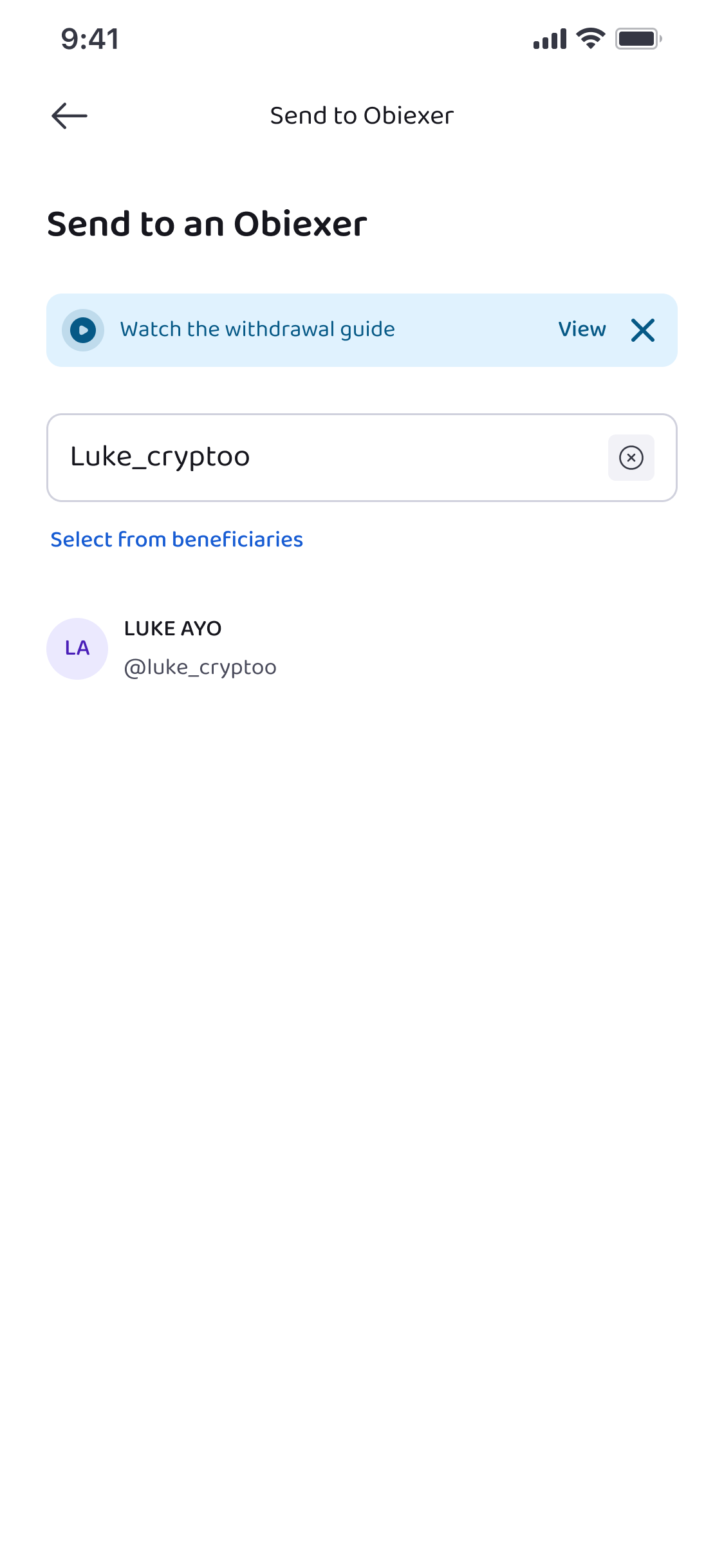
Step 4: Search for the Recipient’s Username
Enter the username of the person you want to send USDT to.
Step 5: Enter the Transfer Details
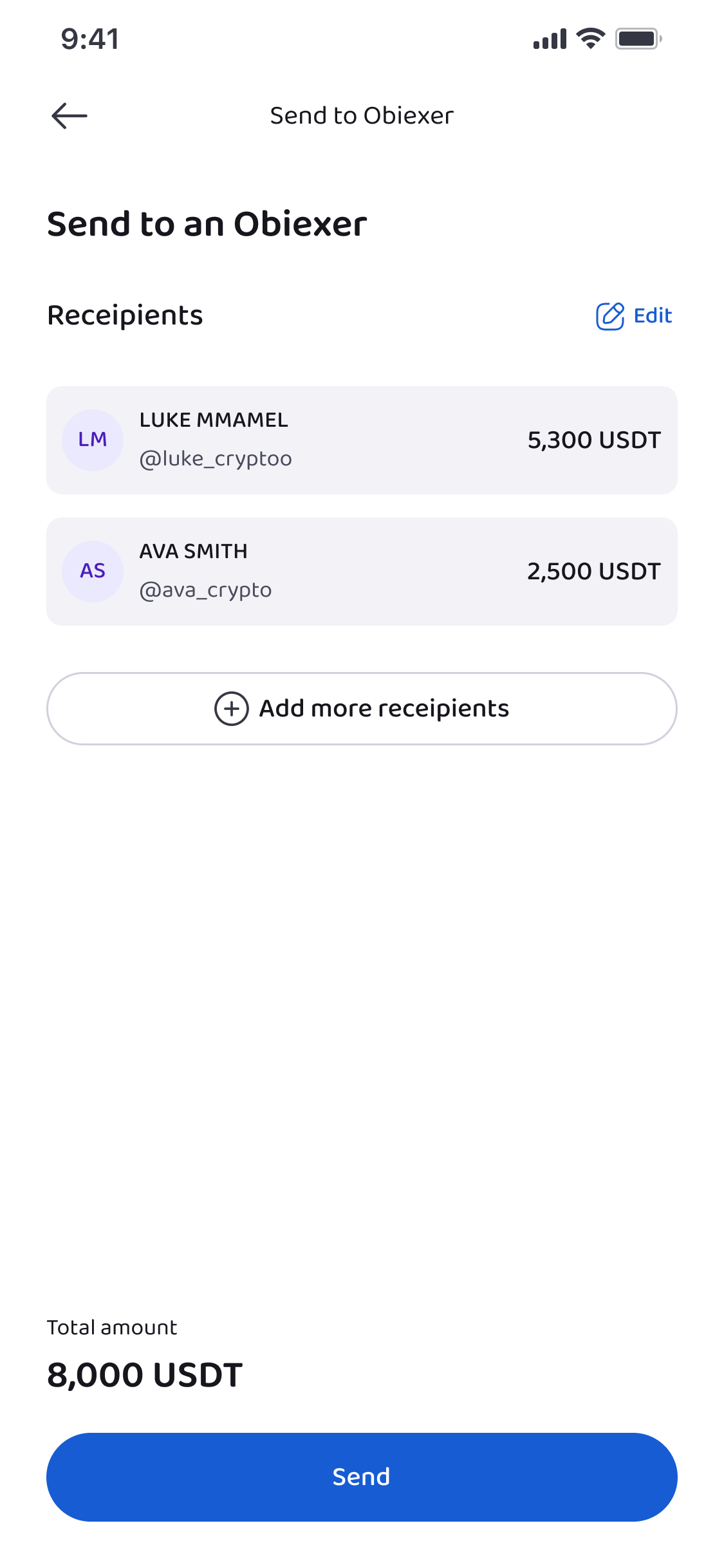
Next, input the necessary information such as:
- The amount of USDT you want to send
- The recipient’s username
Obiex also allows users to send funds to multiple usernames at the same time, which can be useful for group payments or business transactions.
Step 6: Authenticate the Transfer
Just like other withdrawals, the transfer must be verified.
Confirm the transaction using:
- Your transaction PIN
- 2FA, if enabled
Once authenticated, the transfer will be completed.
Because the transaction happens within Obiex, the funds usually arrive almost instantly.
💡Tip: Always confirm the wallet address, verify the network, check your balance to make sure you have enough USDT, and review the transaction preview.
Are you ready to start depositing or withdrawing USDT on Obiex?
👉 Log in to your Obiex account today and move your USDT in just a few simple steps.
Frequently Asked Questions (FAQs)
1. What is USDT?
USDT (Tether) is a cryptocurrency designed to maintain the same value as the US dollar.
2. Can I deposit USDT from another exchange into Obiex?
Yes. You can deposit USDT from any external wallet or exchange using the on-chain deposit option.
3. What is the difference between an on-chain transfer and username transfer?
On-chain transfers use blockchain wallet addresses, while username transfers allow Obiex users to send funds directly to each other using their usernames.
4. How long does a USDT deposit take?
It depends on the blockchain network. Most deposits are confirmed within a few minutes after network confirmation. Obiex to Obiex user deposits are instant.
5. Can I withdraw USDT to another exchange?
Yes. You can withdraw USDT from Obiex to any supported crypto wallet or exchange.
6. What happens if I choose the wrong network?
If the network does not match the receiving wallet, the funds may be lost.
7. Do I need verification before withdrawing crypto?
Yes. You must complete your KYC on Obiex before being able to make use of the app’s features
8. Are username transfers instant?
Transfers between Obiex usernames are usually very fast because they happen inside the Obiex system.
9. Can I send USDT to multiple Obiex users at once?
Yes. Obiex allows transfers to multiple usernames in a single transaction.
10. Is it safe to store USDT on Obiex?
Yes, it is safe. Obiex uses security features such as PIN authentication and 2FA to protect user accounts and transactions.
Disclaimer: This article was written to provide guidance and understanding. It is not an exhaustive article and should not be taken as financial advice. Obiex will not be held liable for your investment decisions.