You can deposit or withdraw crypto on Obiex in two main ways:
- Onchain transactions (sending crypto to or from an external wallet)
- Username transfers (sending crypto directly between Obiex users)
This guide explains both methods clearly, breaking down each step so you can complete a deposit or withdrawal without confusion.
How to Deposit Crypto via Onchain Transfer
Step 1: Log in to Your Obiex Account
Open the Obiex app and sign in with your email and password or use the social sign-in option.
- If you are new to the platform, create an account here with your email address and complete your account setup to deposit funds.
Step 2: Go to the Wallet Section
After logging in, look at the bottom of the app’s homepage.
You will see a menu with several options. Tap on “Wallet.”
The wallet page is where you can manage all your crypto assets. Here you will be able to:
- View your balances
- Deposit crypto
- Withdraw crypto
- Check transaction history
To begin the deposit process, tap “Deposit.”
Step 3: Choose Onchain Deposit
After clicking Deposit, you will see different ways to fund your wallet.
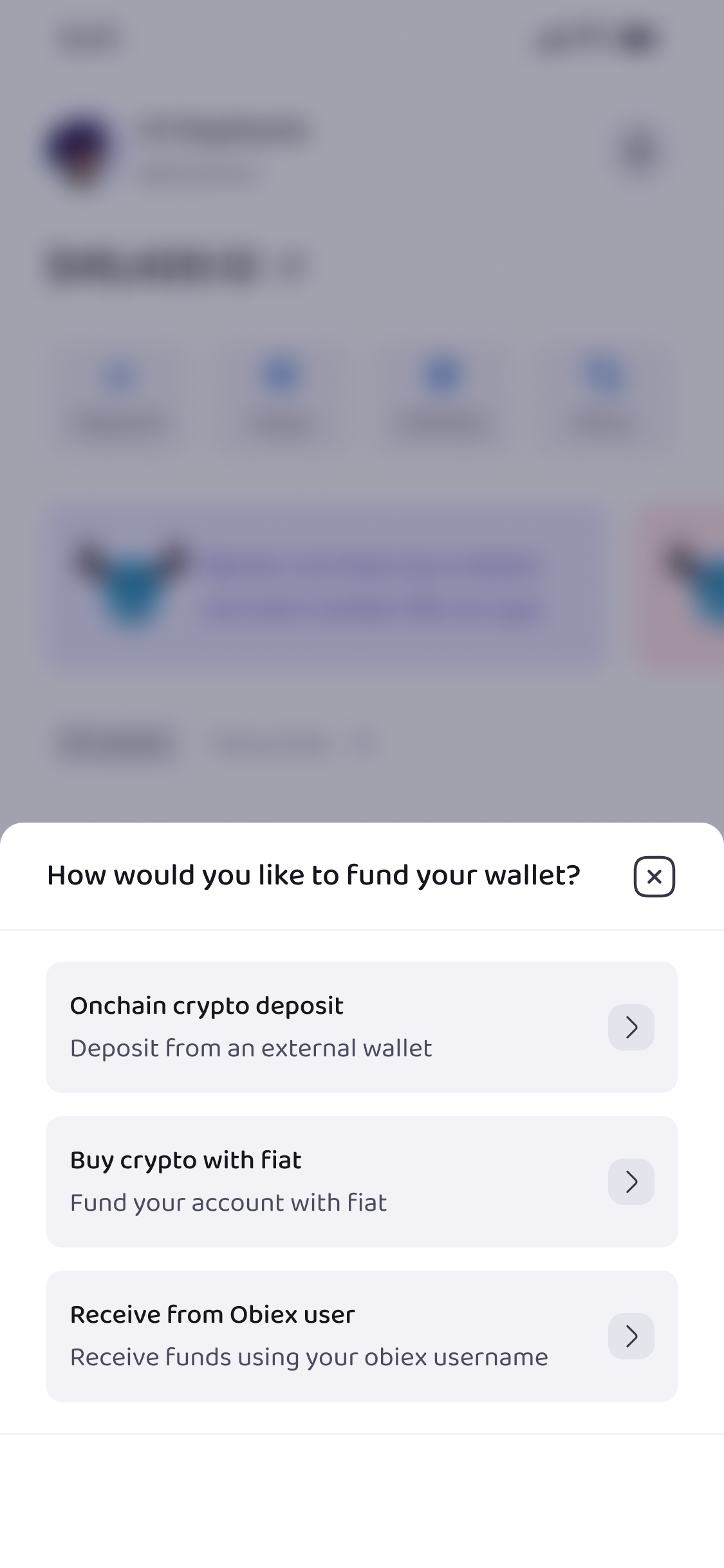
Select Onchain Crypto Deposit.
Step 4: Select the Cryptocurrency (Token)
Next, choose the crypto asset you want to deposit.
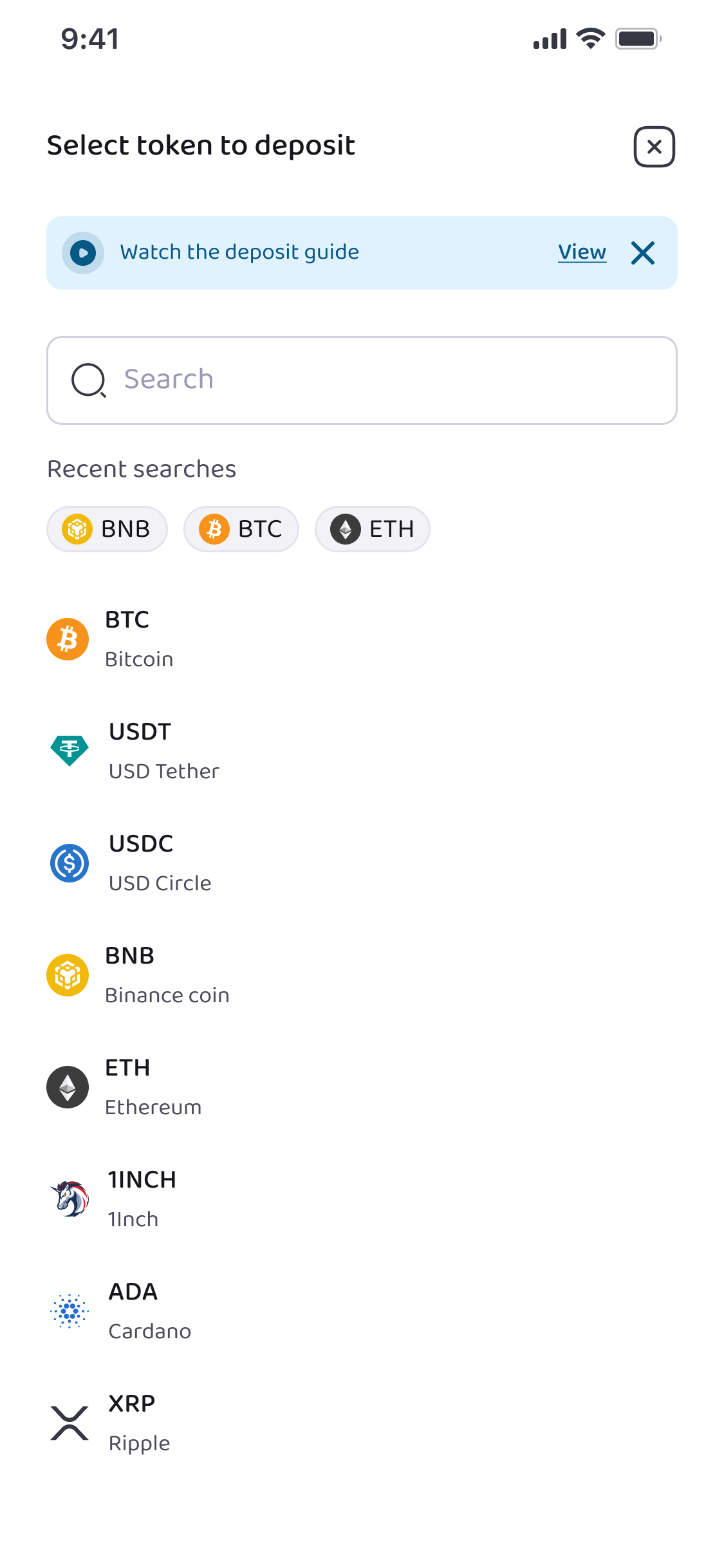
On Obiex, you will see a list of supported coins and tokens, including:
- USDT (Tether)
- BTC (Bitcoin)
- ETH (Ethereum)
- SOL (Solana)
- BNB (Binance Coin)
- ADA (Cardano)
- ARB (Arbitrum)
- AVAX (Avalanche)
- LTC (Litecoin)
- POL (Polygon)
- Other supported cryptocurrencies available on the platform
Select the token you want to receive in your wallet.
This step is important because every cryptocurrency has its own unique wallet address.
For example:
- A Bitcoin address cannot receive USDT
- A USDT address cannot receive Bitcoin
Always make sure you select the correct token before moving to the next step.
Step 5: Select the Network
After choosing the token, select the blockchain network.
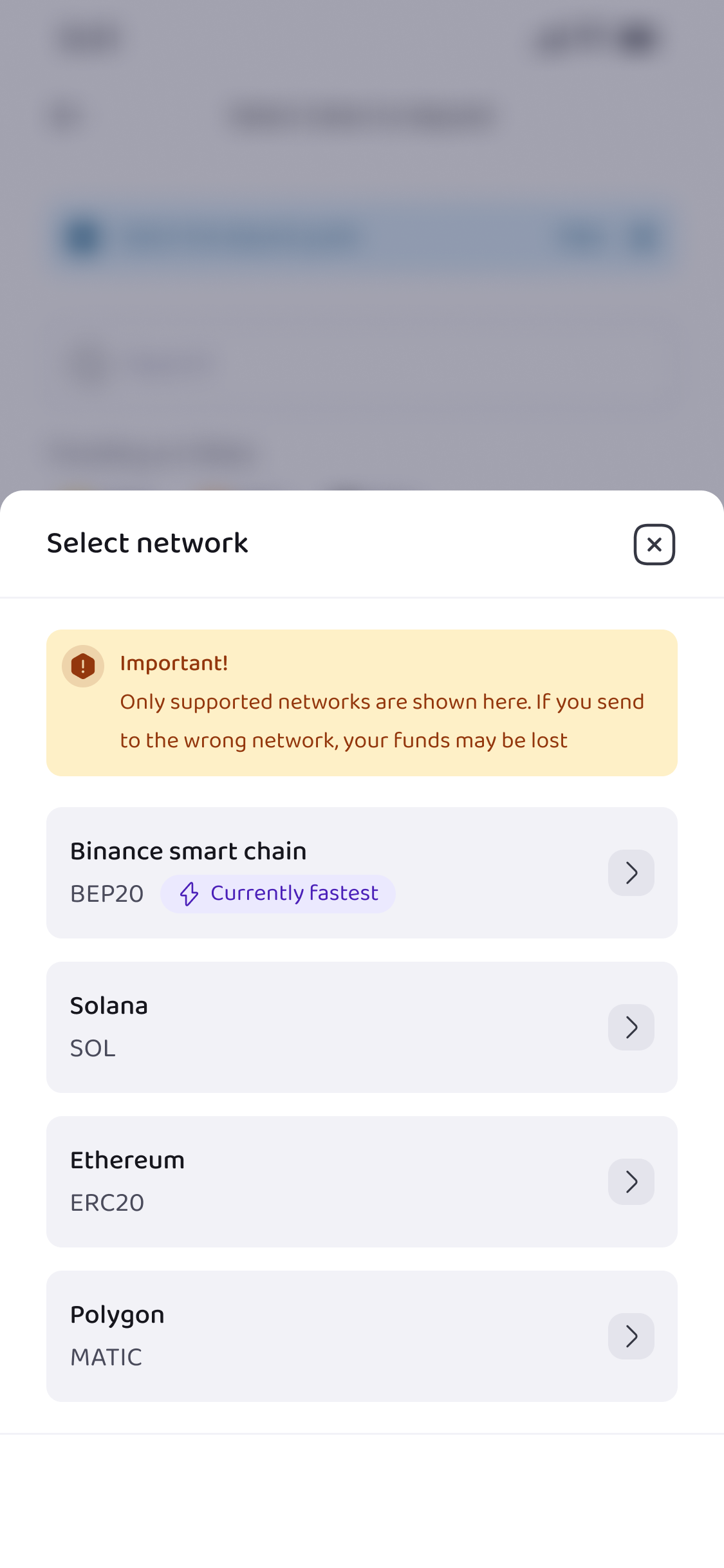
Some tokens can exist on multiple networks. For example, USDT may be available on networks such as:
- TRC20 (Tron Network)
- ERC20 (Ethereum Network)
- BEP20 (BNB Smart Chain)
The network you choose on Obiex must match the network used by the wallet sending the crypto. If the networks do not match, the funds may not arrive.
For example:
- If the sender sends USDT on TRC20, you must select TRC20 on Obiex.
- If they send USDT on ERC20, you must select ERC20.
Always confirm the correct network before proceeding.
Step 6: Copy Your Deposit Address or Share the QR Code
Once the token and network are selected, Obiex will generate your unique deposit address.
This is the wallet address where the crypto will be sent.
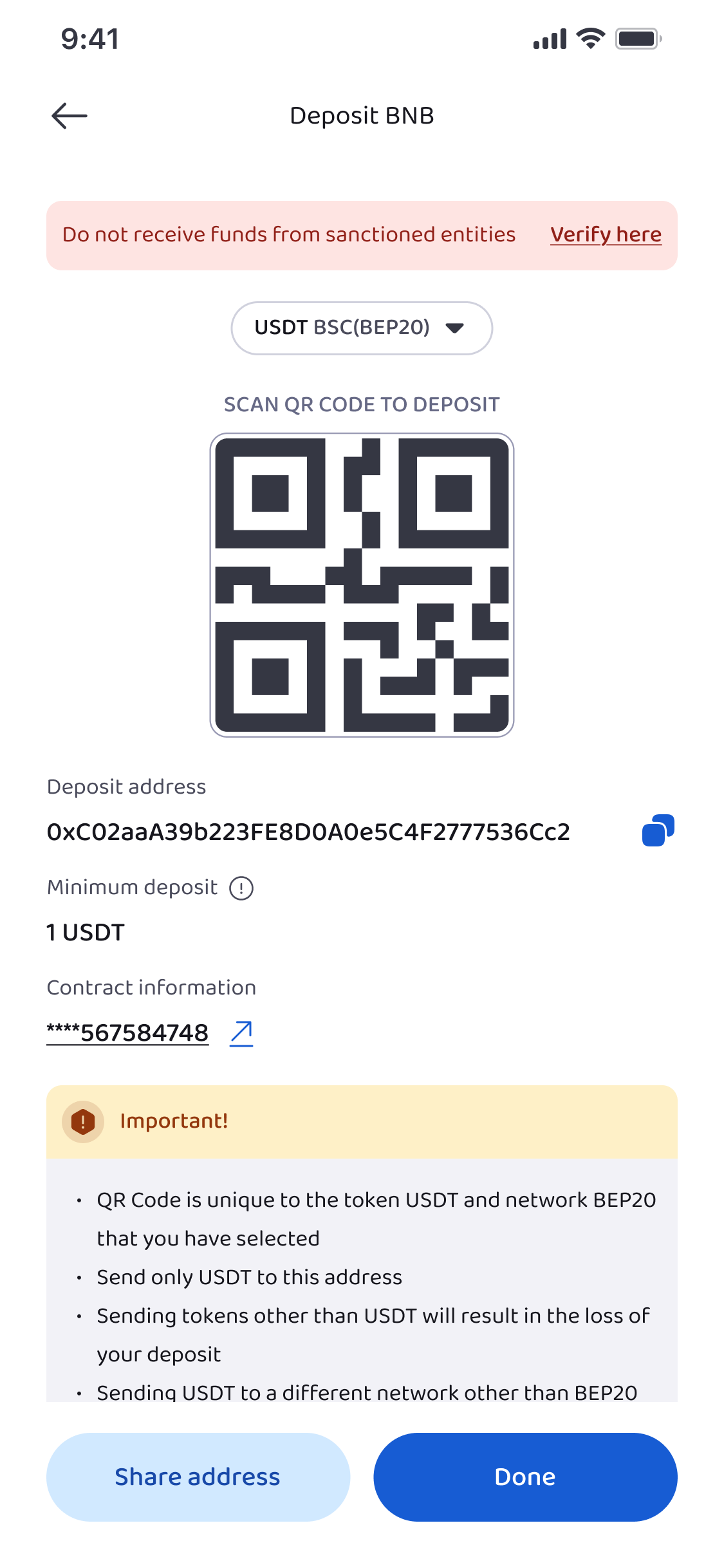
You will see two options:
Option 1: Copy the AddressTap the copy button and paste the address into the sending wallet.
Option 2: Share the QR CodeYou can also share the QR code with the sender so they can scan it directly.
Both options work the same way.
Step 7: Wait for Blockchain Confirmation
After the crypto is sent, it does not appear instantly in most cases.
The blockchain needs to confirm the transaction first.
The waiting time depends on several factors such as:
- The blockchain network used
- Network congestion
- Transaction fees
Some transactions may confirm within a few minutes, while others may take longer.
Once the required confirmations are completed, the crypto will automatically appear in your Obiex wallet balance.
Step 8: Confirm the Deposit in Your Wallet
After the transaction is confirmed, you can verify it inside your Obiex wallet.
Simply go to:
Wallet → Transaction History
Here you will see:
- The deposited token
- The amount received
- The transaction status
Once the status shows completed, your crypto is ready to use.
How to Deposit Crypto via Obiex Username
Step 1: Log Into Your Obiex Account
Open the Obiex app and log into your account.
Once you are logged in, you will arrive at the homepage dashboard, where you can access your wallet and other features.
Step 2: Go to the Wallet Section
At the bottom of the app homepage, tap “Wallet.”
To receive crypto through a username transfer, tap “Deposit.”
Step 3: Select Deposit via Obiex Username
After tapping Deposit, Obiex will show you different ways to fund your wallet.
Choose the option for Receive from Obiex User.
Step 4: Share Your Obiex Social Card
Once you choose the username deposit option, Obiex will generate your social card.
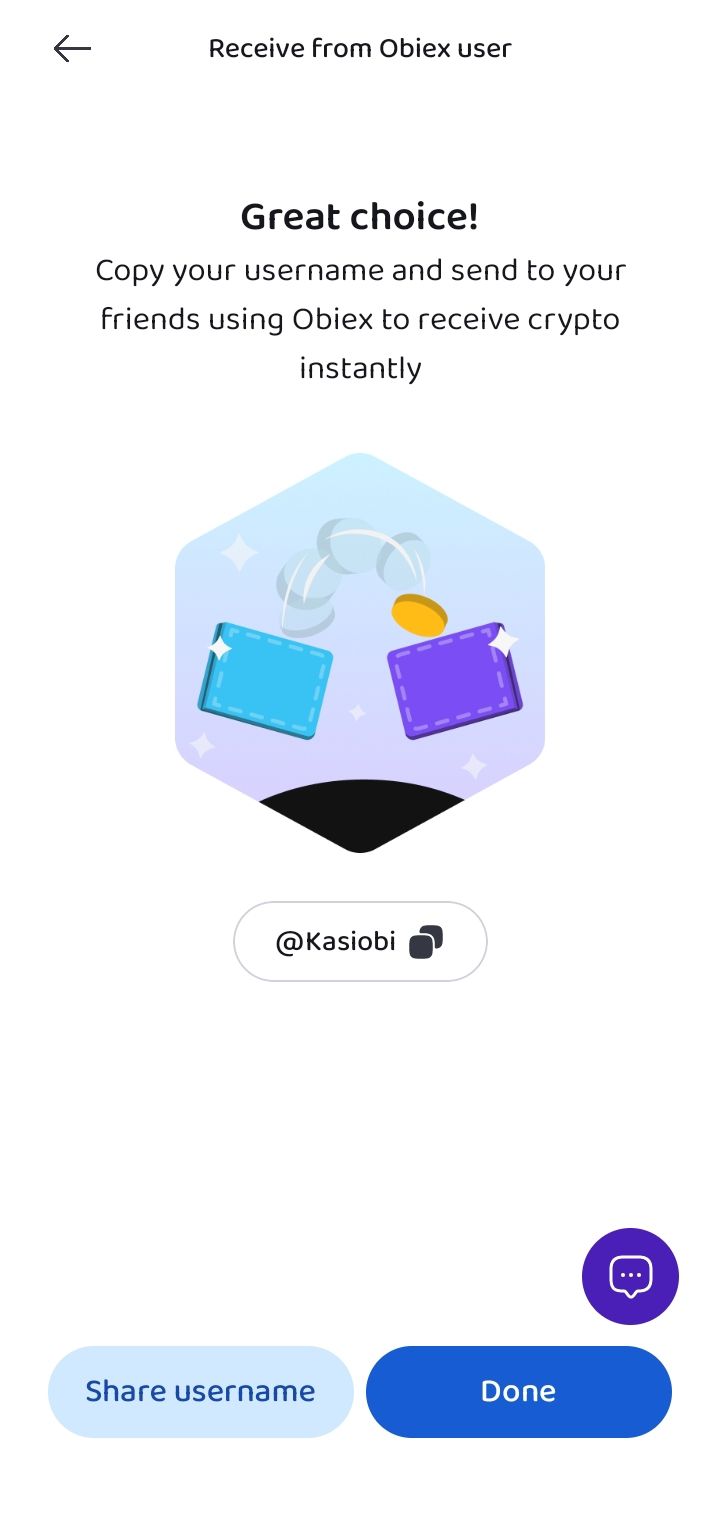
Your social card contains important details such as:
- Your Obiex username
- Information that allows other users to quickly send crypto to you
You can share this social card with anyone who wants to send you crypto on Obiex.
For example, you can send it through:
- Telegram
- Social media
- Direct messages
Step 5: The Sender Searches Your Username
The person sending the crypto will simply:
- Open their Obiex app
- Go to the Withdraw section
- Select Transfer via Username
- Search for your Obiex username
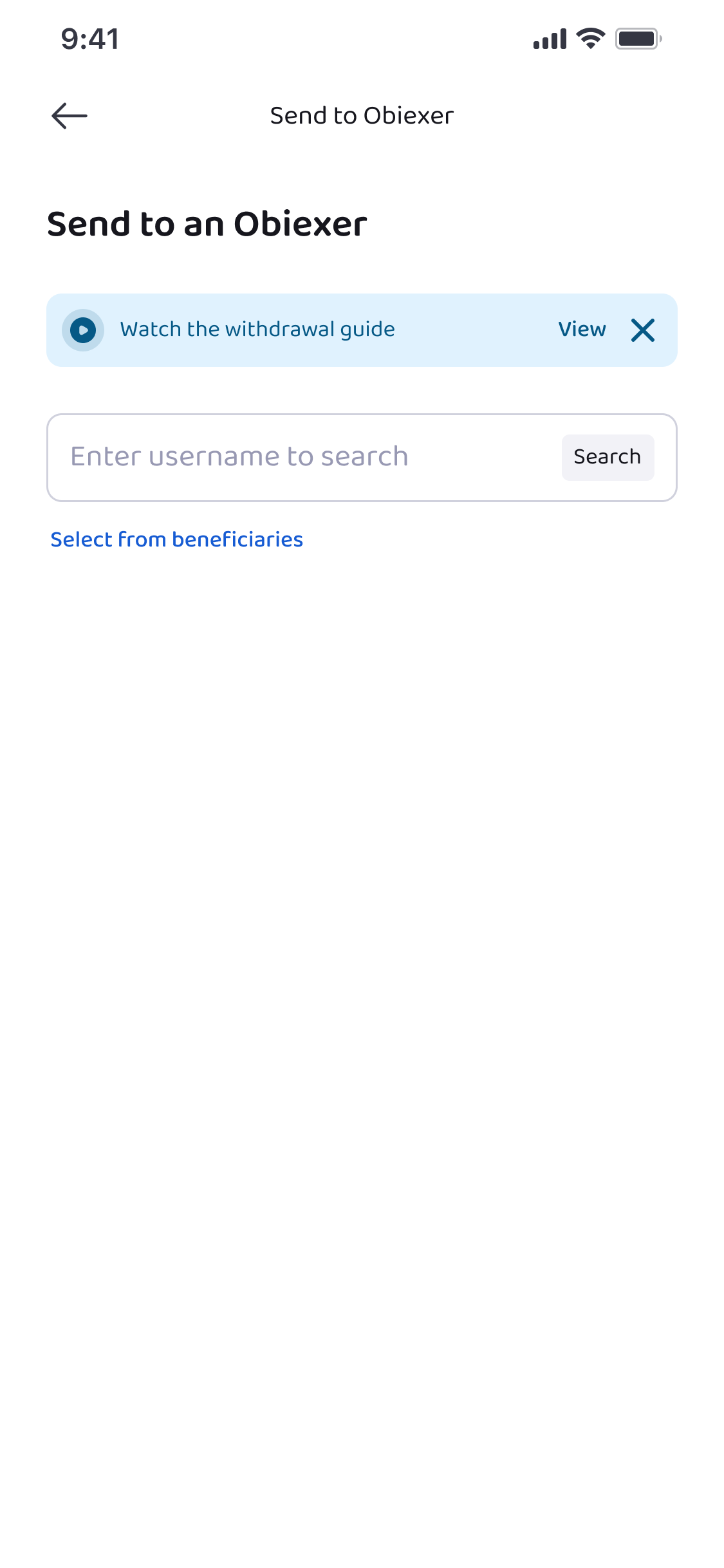
Once they find your account, they can enter the amount they want to send.
Step 6: Sender Confirms the Transfer
After entering the transfer details, the sender will confirm the transaction by completing authentication steps.
Step 7: The Crypto Appears in Your Wallet
Once the transfer is confirmed, the crypto will appear almost instantly in your Obiex wallet.
You can verify the deposit by going to:
Wallet → Transaction History
Here you will see:
- The token received
- The amount deposited
- The sender’s username
- The transaction status
Because this transfer happens inside the Obiex system, it usually does not require blockchain confirmations.
How to Withdraw Crypto via Onchain Transfer
Step 1: Log Into Your Obiex Account
Log into your Obiex account with your email and password or use the social sign-in option.
Once logged in, you will see the homepage dashboard.
Step 2: Go to the Wallet Section
At the bottom of the homepage, tap “Wallet”. This will take you to your crypto wallet where you can manage deposits, withdrawals, and balances.
Step 3: Click Withdraw
Inside your wallet, select Withdraw to start the withdrawal process.
Step 4: Choose Onchain Withdrawal
Obiex will show you different withdrawal options. Select Onchain Crypto Withdrawal, which is used to send crypto to an external wallet or exchange outside of Obiex.
Step 5: Select the Token and Network
- Select the cryptocurrency you want to withdraw (e.g., BTC, USDT).
- Select the blockchain network that matches the receiving wallet.
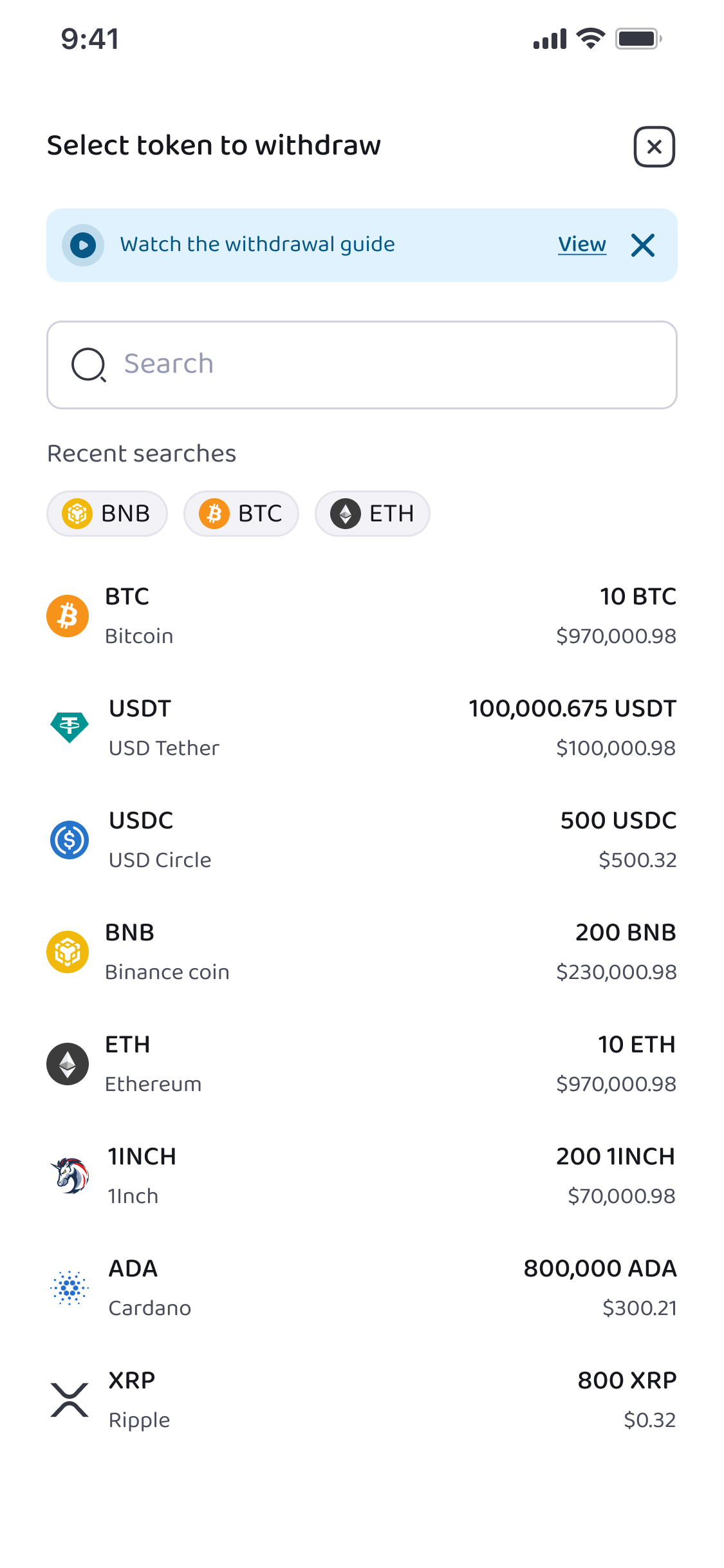
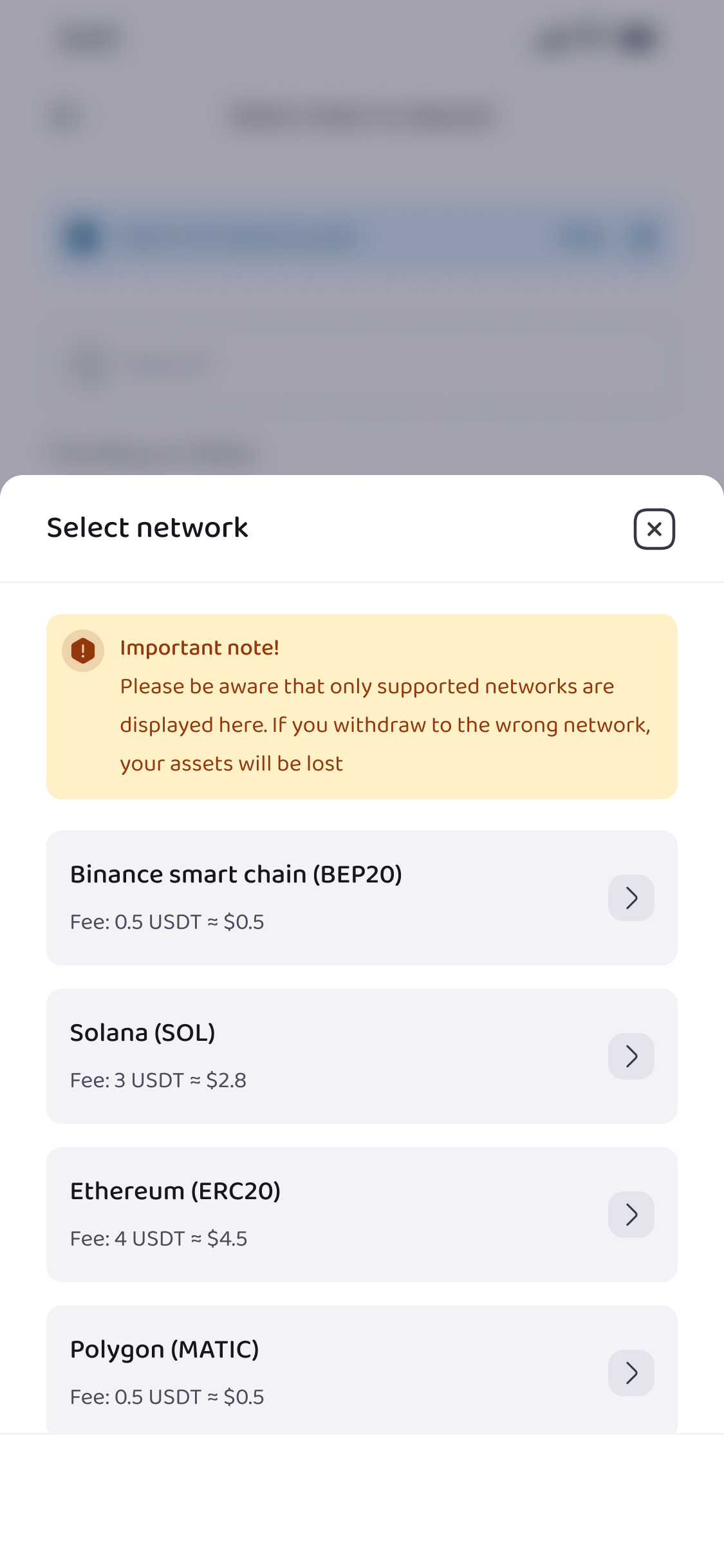
Again, if the network you choose on Obiex does not match the receiving wallet's network, your crypto may be permanently lost. Always confirm the correct network before proceeding.
Step 6: Enter Withdrawal Details
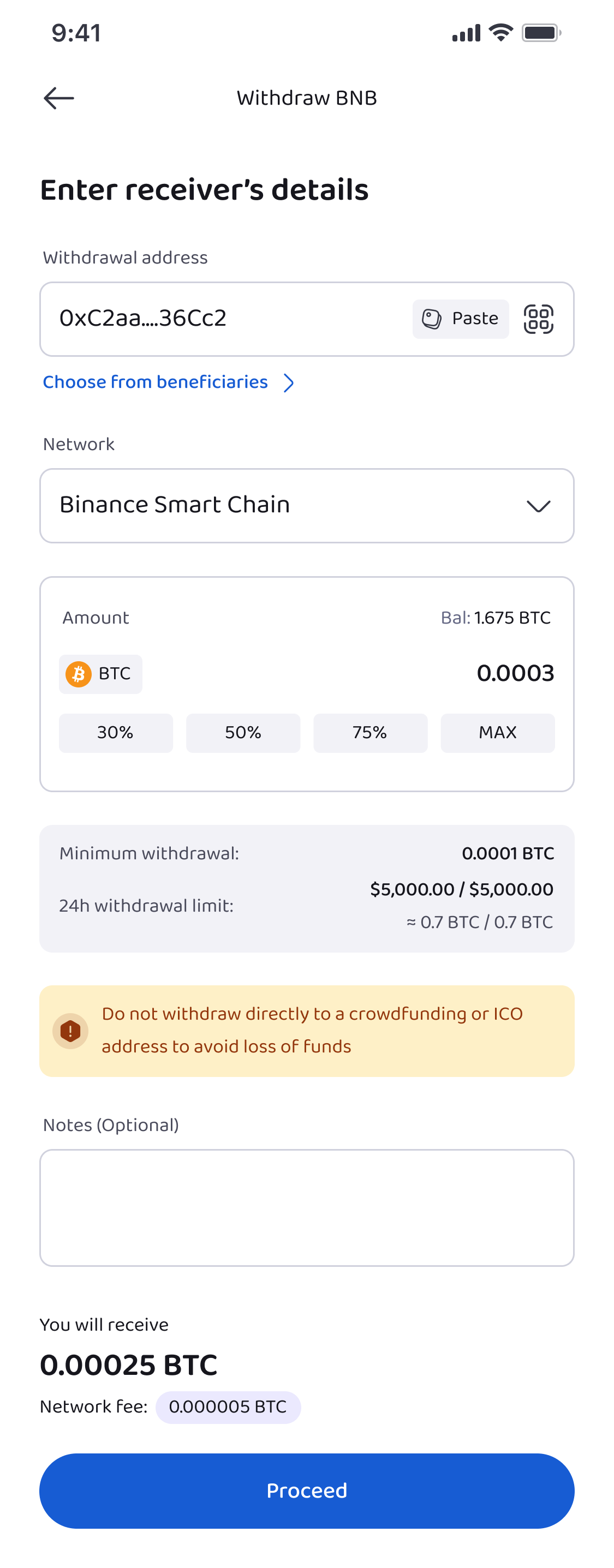
Fill in the following:
- Wallet address: The address of the external wallet where you want to send your crypto.
- Amount: How much crypto you want to send.
Double-check both the address and the amount. Even a small mistake in the wallet address can cause permanent loss of funds.
Step 7: Preview the Withdrawal
Obiex will show a preview page summarising:
- Token type
- Network
- Amount
- Destination address
Review everything carefully. This is your last chance to correct mistakes before sending.
Step 8: Authenticate the Withdrawal
To complete the transaction, Obiex requires authentication for security:
- Enter your transaction PIN
- Complete two-factor authentication (2FA) if enabled
Once authenticated, the withdrawal is submitted to the blockchain for processing.
Step 9: Wait for Blockchain Confirmation
On-chain withdrawals are processed by the blockchain network, not by Obiex. This means the time it takes depends on:
- The network used (Bitcoin may take longer than USDT on TRC20)
- Network congestion
- Transaction fees
Once the network confirms the transaction, the funds will appear in the receiving wallet. You can track it using the blockchain transaction ID.
How to Withdraw Crypto via Obiex Username
Step 1: Log Into Your Obiex Account
Open the Obiex app and log in with your email and password, or use the social sign in option.
Step 2: Go to the Wallet Section
Tap Wallet at the bottom of the app to access your crypto balances and transaction options.
Step 3: Click Withdraw
Inside your wallet, tap Withdraw.
Step 4: Choose Transfer via Username
Select Send to an Obiexer. This option allows you to send crypto directly to another Obiex user.
Step 5: Search for the Recipient
Enter the username of the recipient in the search bar. Obiex will show matching accounts. Select the correct user carefully to avoid sending crypto to the wrong person.
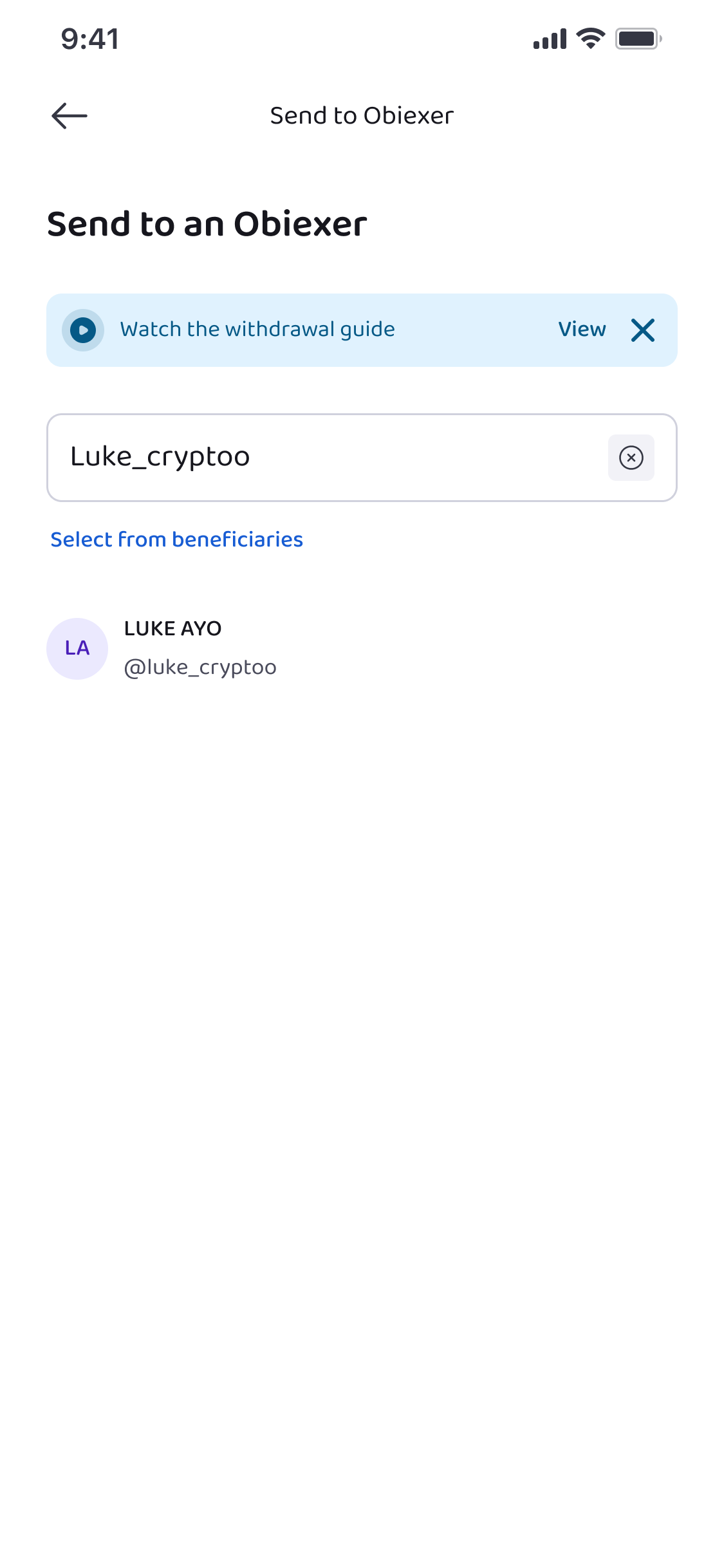
✅ Tip: You can also send crypto to multiple usernames at once if needed.
Step 6: Enter Transfer Details
Input:
- Amount of crypto you want to send
- Token type (e.g., BTC, USDT)
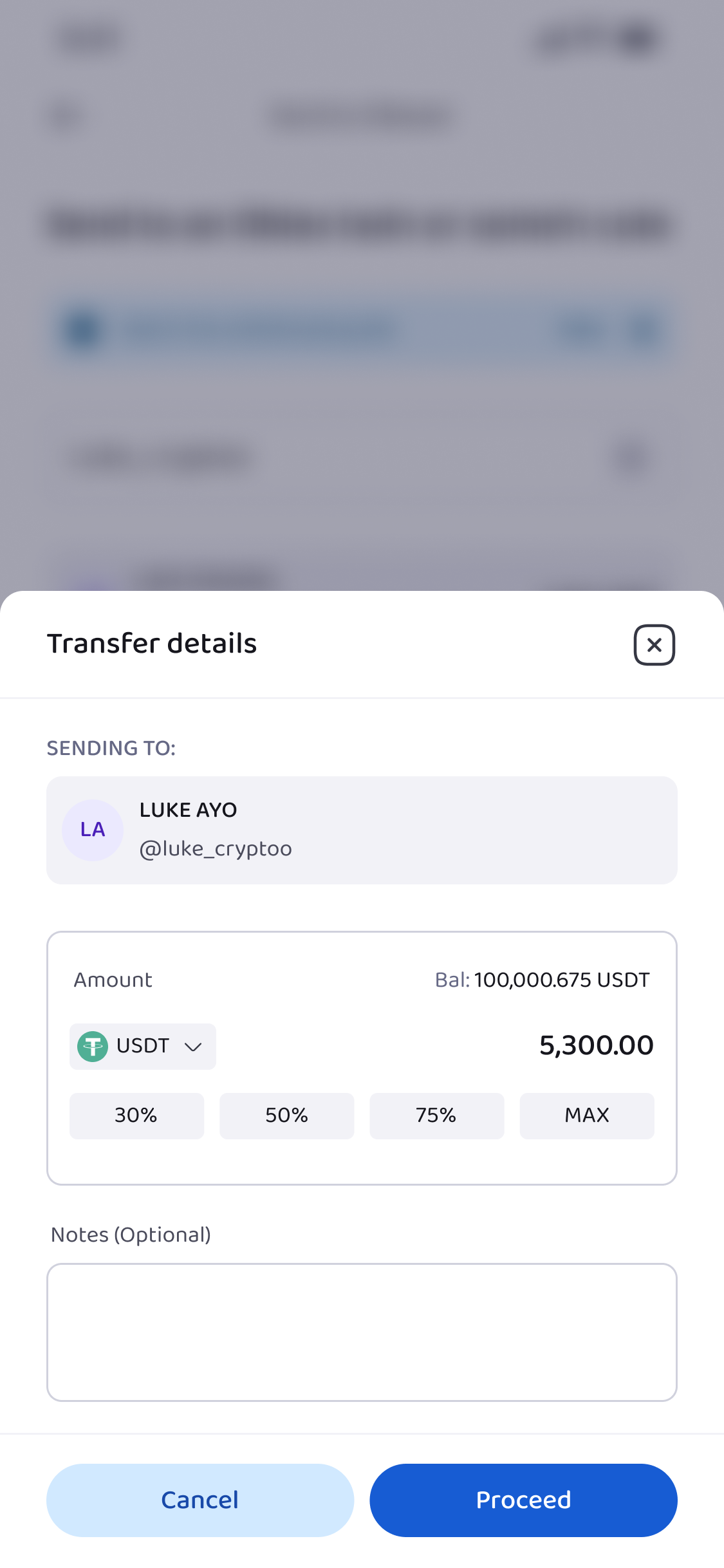
Double-check the information before proceeding.
Step 7: Authenticate the Transfer
Just like onchain withdrawals, you must authenticate the transfer:
- Enter your transaction PIN
- Complete 2FA authentication if enabled
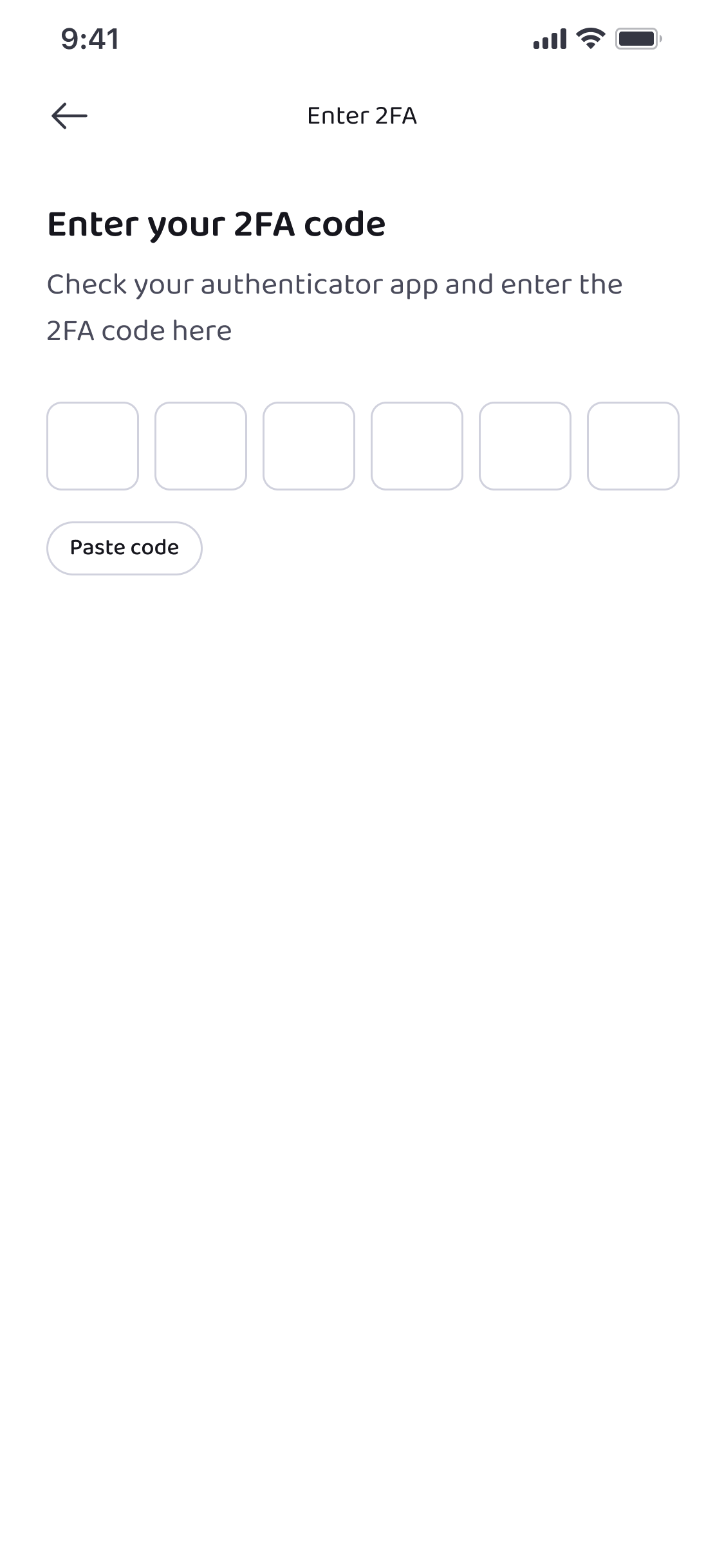
After authentication, the transfer is processed instantly.
Step 8: Confirm the Transfer
Once complete, the crypto will appear in the recipient’s wallet. You can confirm the transfer by checking your Wallet → Transaction History. You’ll see:
- Token sent
- Amount
- Recipient username
- Status of the transaction
Because this happens within the Obiex system, there is no need to wait for blockchain confirmations.
Are you ready to start depositing or withdrawing crypto on Obiex V4?
👉 Log in to your Obiex account today and move your crypto in just a few simple steps.
Frequently Asked Questions (FAQs)
1. What is the easiest way to deposit crypto on Obiex?
The easiest way is through username transfer, where another Obiex user sends crypto directly to your username.
2. How long does it take for a crypto deposit to reflect?
Username transfers are usually instant, while on-chain deposits depend on blockchain confirmations.
3. Can I deposit any cryptocurrency into Obiex?
You can deposit supported cryptocurrencies available on the platform.
4. Why do I need to select a network when depositing crypto?
Different blockchains process transactions differently. Selecting the correct network ensures your funds arrive safely.
5. Is there a fee for depositing crypto?
Most deposits are free, but blockchain network fees may apply when sending from another wallet.
6. Can I withdraw crypto to another exchange?
Yes. Use on-chain withdrawal and send the funds to the wallet address provided by the other exchange.
7. What happens if I send crypto to the wrong address?
Crypto transactions cannot usually be reversed, so funds sent to the wrong address may be permanently lost.
8. Can I send crypto to multiple Obiex users at once?
Yes. Obiex allows transfers to multiple usernames in one transaction.
9. Why is my withdrawal still pending?
Withdrawals may be delayed due to network congestion, security checks, or blockchain confirmation time.
10. How do I make my Obiex account more secure?
Enable 2FA authentication, use a strong password, and always verify transaction details before confirming transfers.
Disclaimer: This article was written to provide guidance and understanding. It is not an exhaustive article and should not be taken as financial advice. Obiex will not be held liable for your investment decisions.