How to Deposit BTC on Obiex
Depositing BTC means sending Bitcoin into your Obiex wallet from another crypto wallet or exchange.
To complete this transaction, follow the steps below.
Step 1: Log in to Your Obiex Account
Open the Obiex app and sign in with your email and password or use the social sign-in option.
- If you are new to the platform, create an account here with your email address and complete your account setup to deposit funds.
Once you are logged in, move on to the wallet section, where all deposits and withdrawals are managed.
Step 2: Open Your Wallet
At the bottom of the Obiex app homepage, you will see several options. Tap Wallet to open your wallet dashboard.
Your wallet is where you can:
- View your crypto balances
- Deposit cryptocurrency
- Withdraw cryptocurrency
- Send and receive funds
Step 3: Click on Deposit
Once you are on the wallet page, the Deposit button is at the left-hand corner.
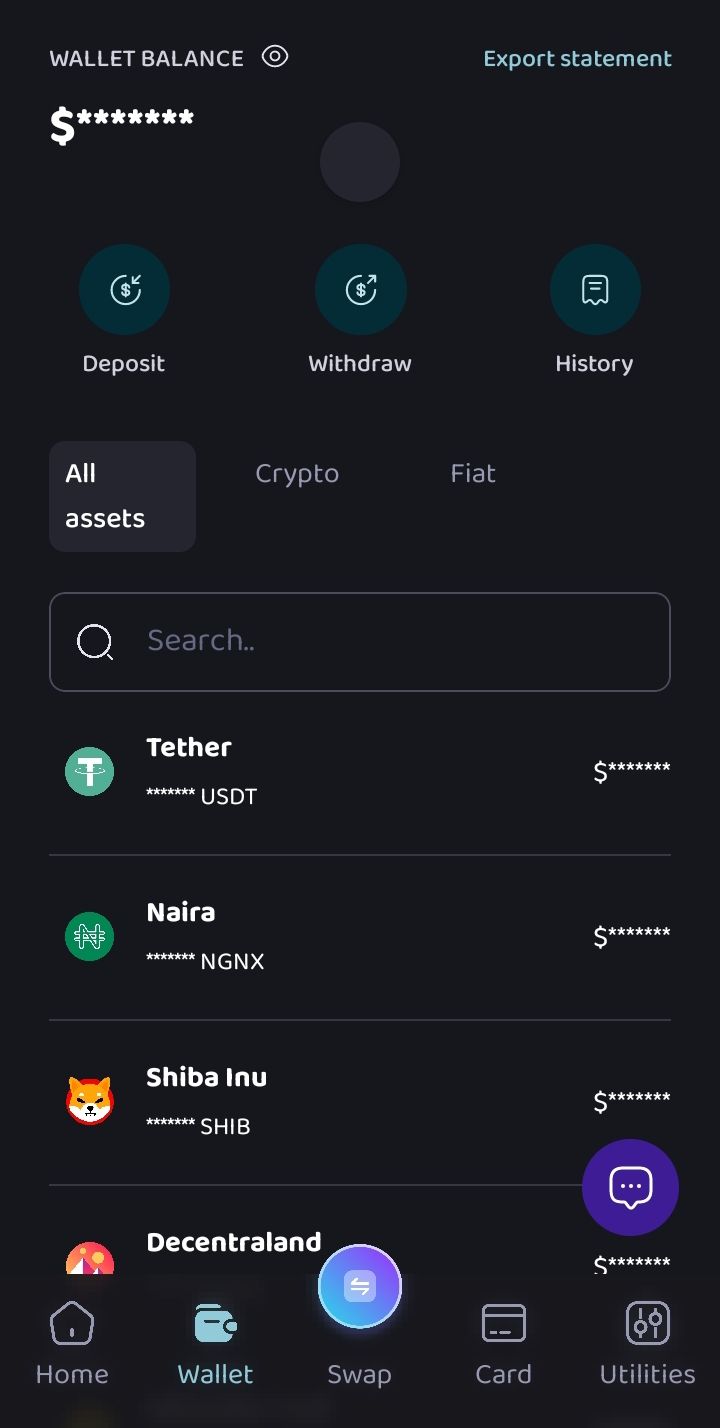
Tap on Deposit to begin the process of adding BTC to your wallet. This will open the deposit options available on the platform.
You can deposit crypto in two main ways, depending on where the funds are coming from.
Step 4: Choose Your Deposit Method
You have two options:
- On-Chain Deposit
- Transfer via Obiex Username
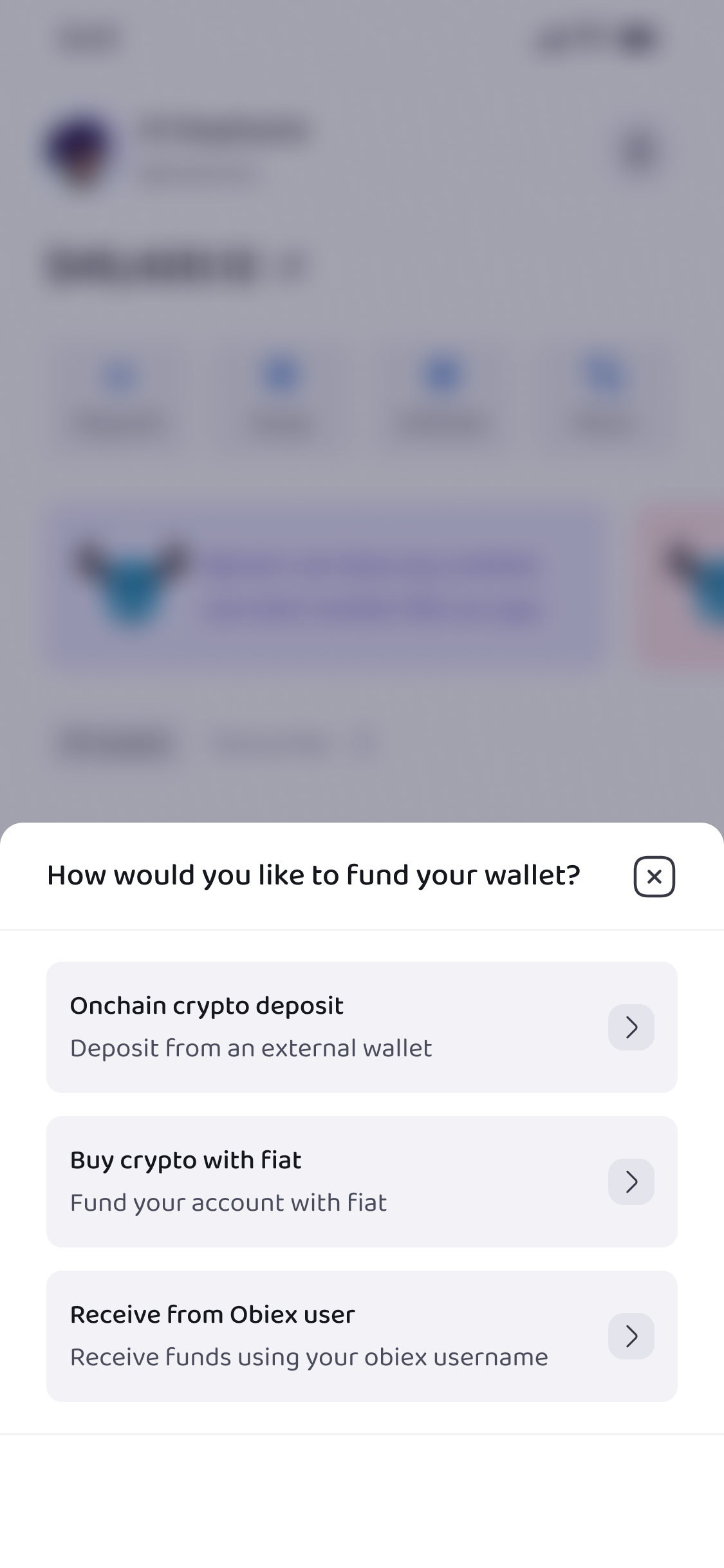
Both methods allow you to receive Bitcoin, but they are used in different situations.
- On-chain deposit is used when you are sending BTC from another wallet or exchange.
- Username transfer is used when another Obiex user is sending BTC directly to your account.
Let’s look at both methods.
Step 5: Depositing BTC via On-Chain Transfer
To use this method, follow these steps:
First, select Onchain Crypto Deposit from the deposit options.
Next, choose the token you want to deposit. Since you are depositing Bitcoin, select BTC from the list of available cryptocurrencies.
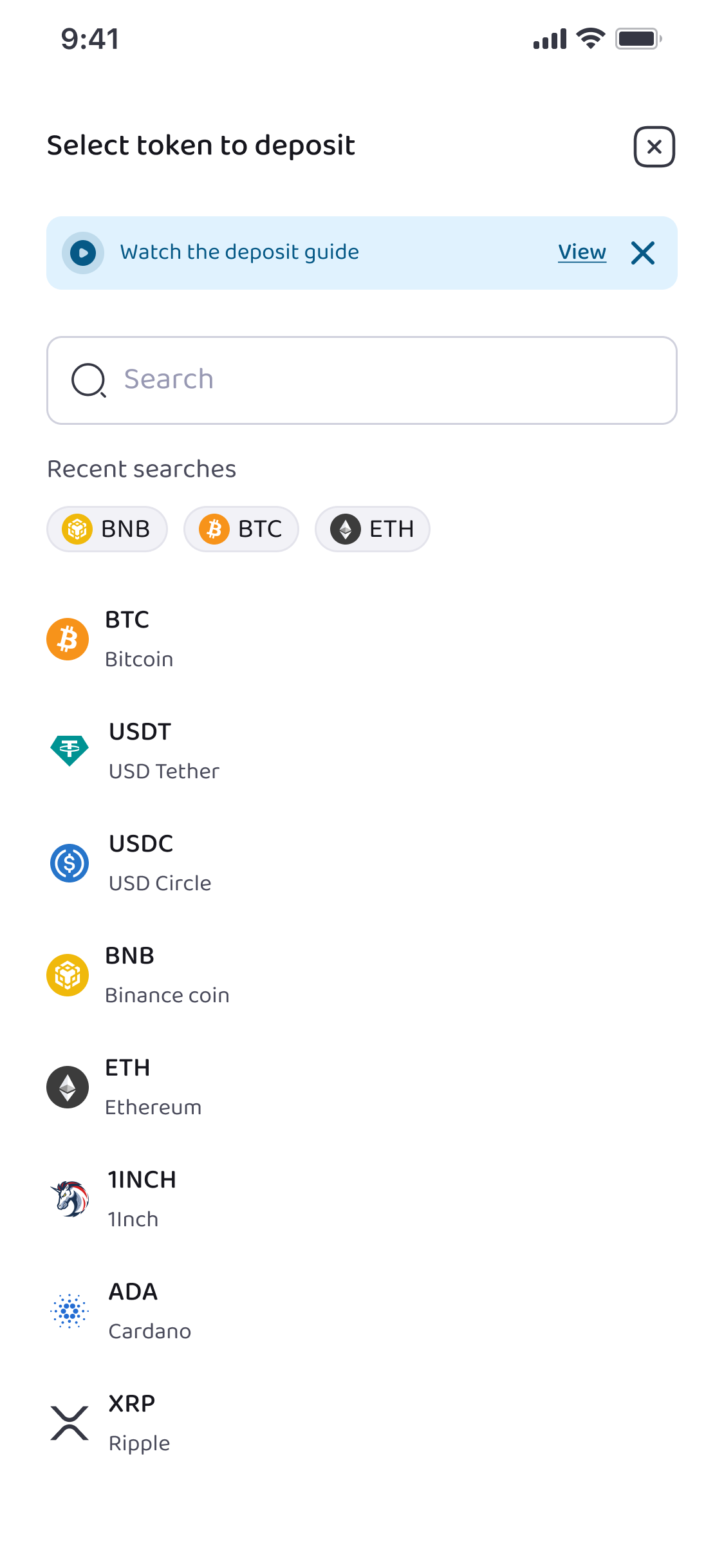
After selecting BTC, you will need to choose the network.
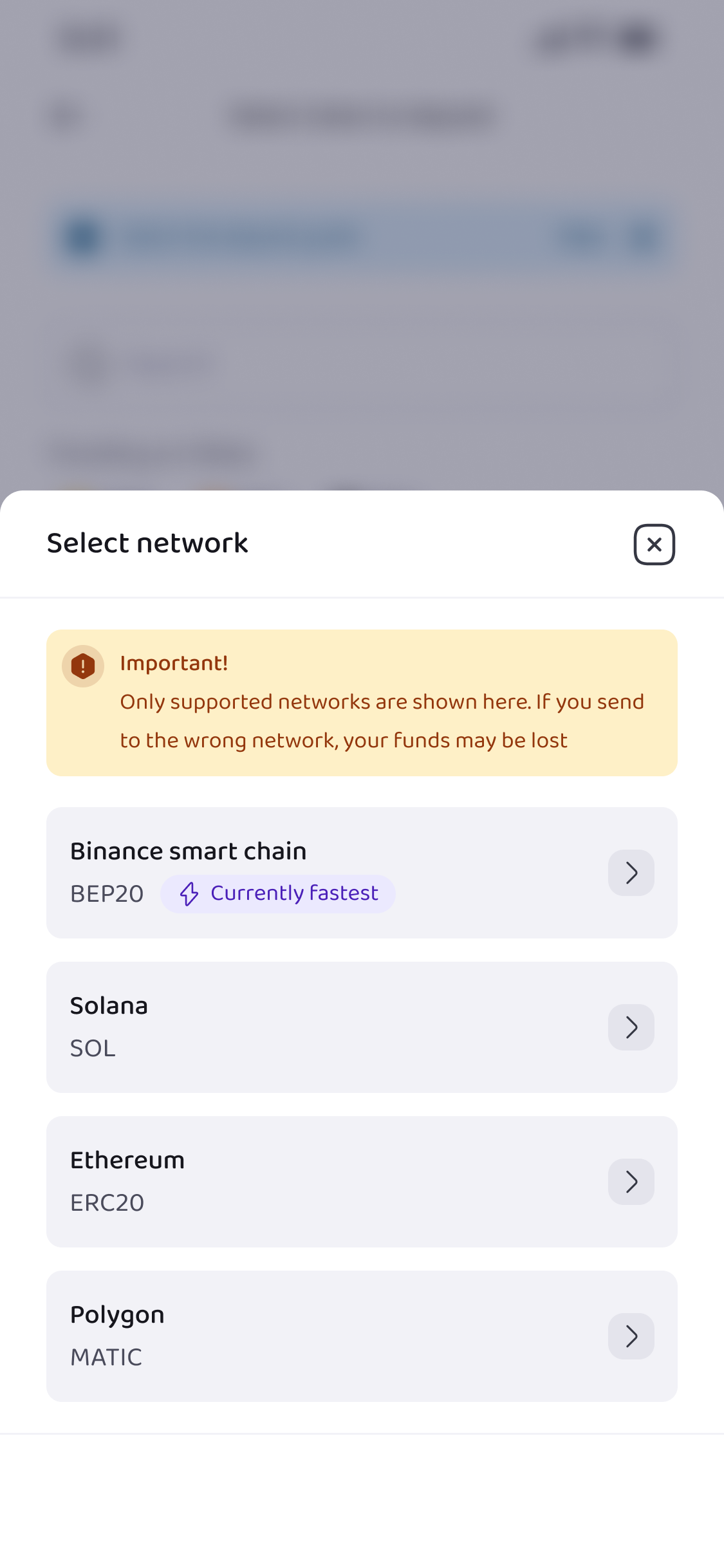
On Obiex, we support the following networks:
- Tron (TRC20)
- Ethereum (ERC20)
- BSC (BEP20)
- Solana (SOL)
- Polygon (MATIC)
- Arbitrum One (ARBITRUM)
- Avax C-Chain (AVAXC)
The network is the blockchain system used to process the transaction. Make sure you select the correct network that matches the one used by the wallet you are sending from.
Once you select the token and network, Obiex will display your BTC deposit details. These details include:
- Your BTC wallet address
- A QR code linked to that address
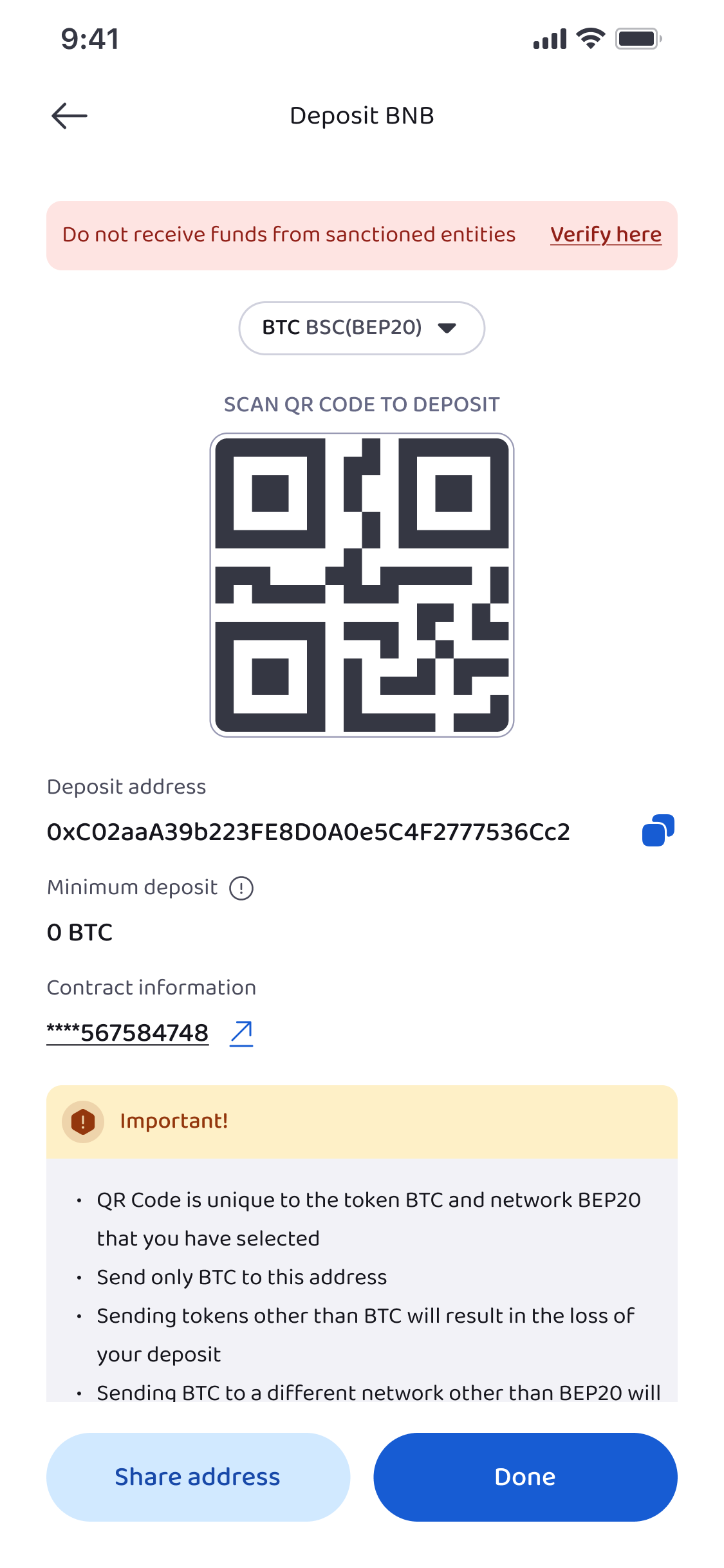
At this stage, you can proceed in two different ways depending on how the BTC will be sent.
5a: Copy Your BTC Wallet Address to Deposit from Another Wallet
If you want to send BTC from another wallet or exchange that you control, you will need to copy your Obiex wallet address.
Tap Copy Address to copy the BTC wallet address shown on the screen.
Next:
- Go to the wallet or exchange where your BTC is currently stored
- Open the Withdraw section
- Paste your Obiex BTC wallet address into the destination address field
- Enter the amount of BTC you want to send
- Confirm the transaction
Once the transaction is sent, the Bitcoin network will process it. After the required confirmations are completed on the blockchain, the BTC will appear in your Obiex wallet balance.
5b: Share Your BTC Wallet Address with Someone Sending You BTC
If someone else wants to send you BTC from their wallet, you simply need to share your Obiex BTC wallet address with them.
From the deposit page, you can either:
- Copy the wallet address and send it to the person, or
- Share the QR code so they can scan it with their wallet app
The sender will then paste the wallet address into their own wallet’s Send or Withdraw section and enter the amount of BTC they want to transfer.
Once they complete the transaction, the Bitcoin network will confirm it. After confirmation, the BTC will be deposited into your Obiex wallet automatically.
Step 6: Depositing BTC Using an Obiex Username
Obiex also allows users to send crypto directly to each other using usernames instead of wallet addresses. This makes transfers between Obiex users faster and easier.
To deposit BTC this way, select Receive from Obiex User.
Once you select this option, you can generate or access your Obiex social card. The social card contains your username and can be shared with the person sending you BTC.
You can send the card to the sender, or simply share your Obiex username with them. The sender can then search for your username within the platform and transfer BTC directly to your wallet.
One major advantage of this method is that it does not require blockchain confirmations, so the transfer is often completed much faster.
💡Quick Tip: Before sending BTC to your Obiex wallet, it is always a good idea to follow a few simple precautions.
First, double-check the wallet address before sending funds. Even a small mistake in the address can cause the transaction to go to the wrong wallet.
Second, ensure that you select the correct network. Sending funds through the wrong network may result in lost funds.
Third, if you are sending a large amount of BTC, consider sending a small test transaction first. This helps confirm that everything is working correctly.
Finally, make sure you are using the official Obiex app or website when performing any transaction.
How to Withdraw BTC on Obiex
Withdrawing BTC means sending Bitcoin from your Obiex wallet to another wallet or user.
To achieve this, follow these steps.
Step 1: Log in and Open Your Wallet
Once you are logged in, go to the bottom of the homepage and tap Wallet. This will take you to your wallet dashboard, where all the available crypto assets are displayed.
Step 2: Click on Withdraw
After opening your wallet, tap Withdraw. This will open the withdrawal menu, where you can choose how you want to send your funds.
Step 3: Choose Your Withdrawal Method
You can withdraw BTC in two different ways, depending on who you are sending the funds to.
The two withdrawal options are:
- Onchain Withdrawal
- Transfer via Obiex Username
Let’s go through both options in detail.
Step 4: Withdrawing BTC via On-Chain Withdrawal
To withdraw BTC this way, select Onchain Crypto Withdrawal.
Next, choose the token you want to withdraw. In this case, select BTC from the list of available cryptocurrencies.
After selecting BTC, choose the deposit network.
💡Make sure the network matches the one supported by the wallet you are sending the BTC to. Once the network is selected, you will be asked to enter the withdrawal details.
These details include:
- The destination wallet address
- The amount of BTC you want to send
Carefully paste or enter the wallet address of the recipient. It is always important to double-check the address to ensure it is correct.
After entering the address and amount, tap Proceed to move to the preview stage.
Step 4: Preview Your Withdrawal
Before the withdrawal is completed, Obiex will show you a preview of the transaction.
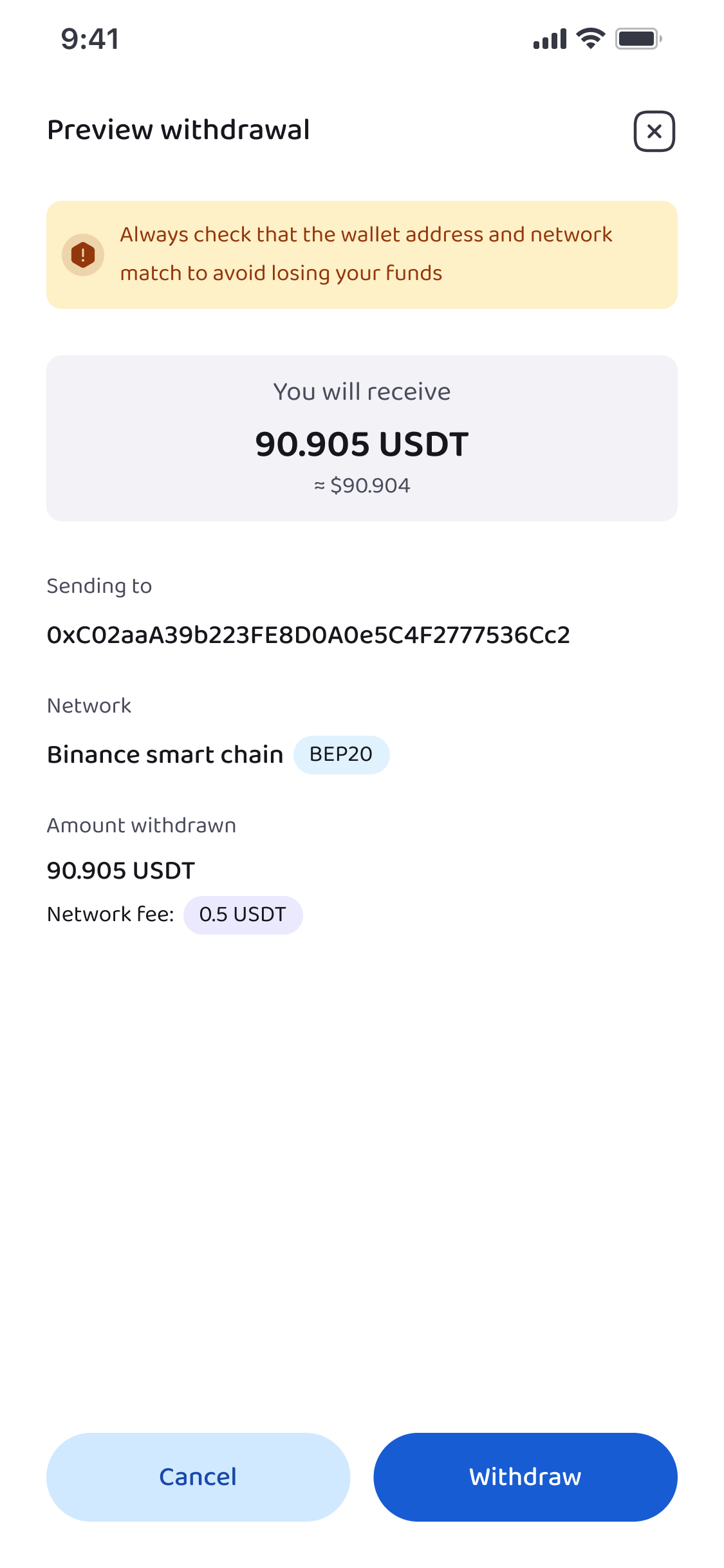
This preview allows you to confirm important details such as:
- The wallet address you are sending to
- The network being used
- The amount of BTC being withdrawn
- Any applicable transaction fees
Take a moment to review everything carefully. If something is wrong, this is the stage where you can go back and correct it.
Once you are sure the details are correct, you can proceed to confirm the transaction.
Step 5: Authenticate the Withdrawal
For security reasons, Obiex requires you to confirm withdrawals before they are processed.
To complete the transaction, you will need to authenticate it using one or more of the following:
- Your transaction PIN
- Two-Factor Authentication (2FA), if it is enabled on your account
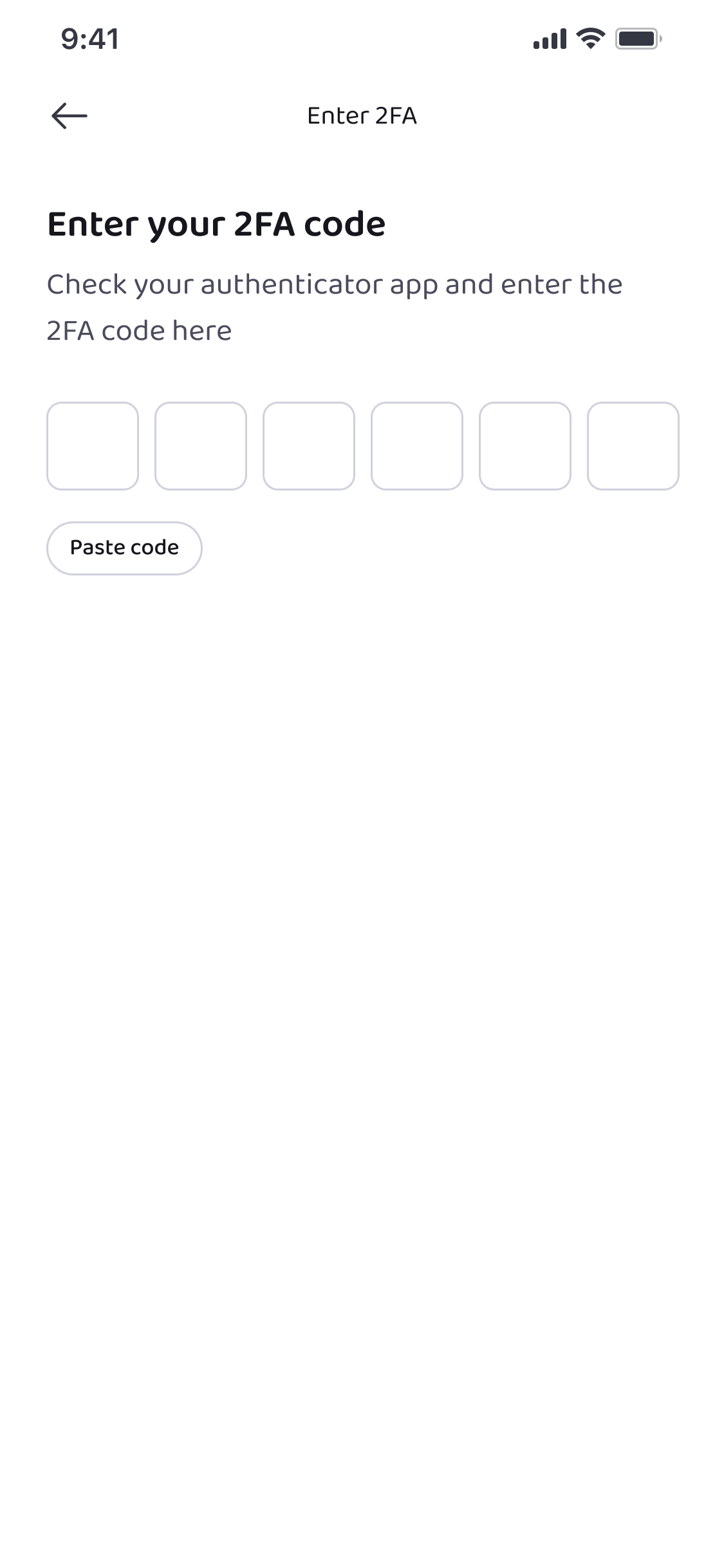
This extra security step helps protect your funds and ensures that only you can authorise withdrawals from your account.
Once authentication is successful, the BTC will be sent to the destination wallet, and the transaction will be processed on the blockchain.
Step 6: Withdrawing BTC Using an Obiex Username
If you are sending BTC to another Obiex user, you can use the username transfer option instead of an on-chain withdrawal.
To do this:
- Select Send to an Obiexer from the withdrawal options.
- Next, search for the recipient’s Obiex username.
- Once you find the correct user, enter the amount of BTC you want to send.
- Obiex also lets you send BTC to multiple usernames at once, which can be useful when sending funds to several people.
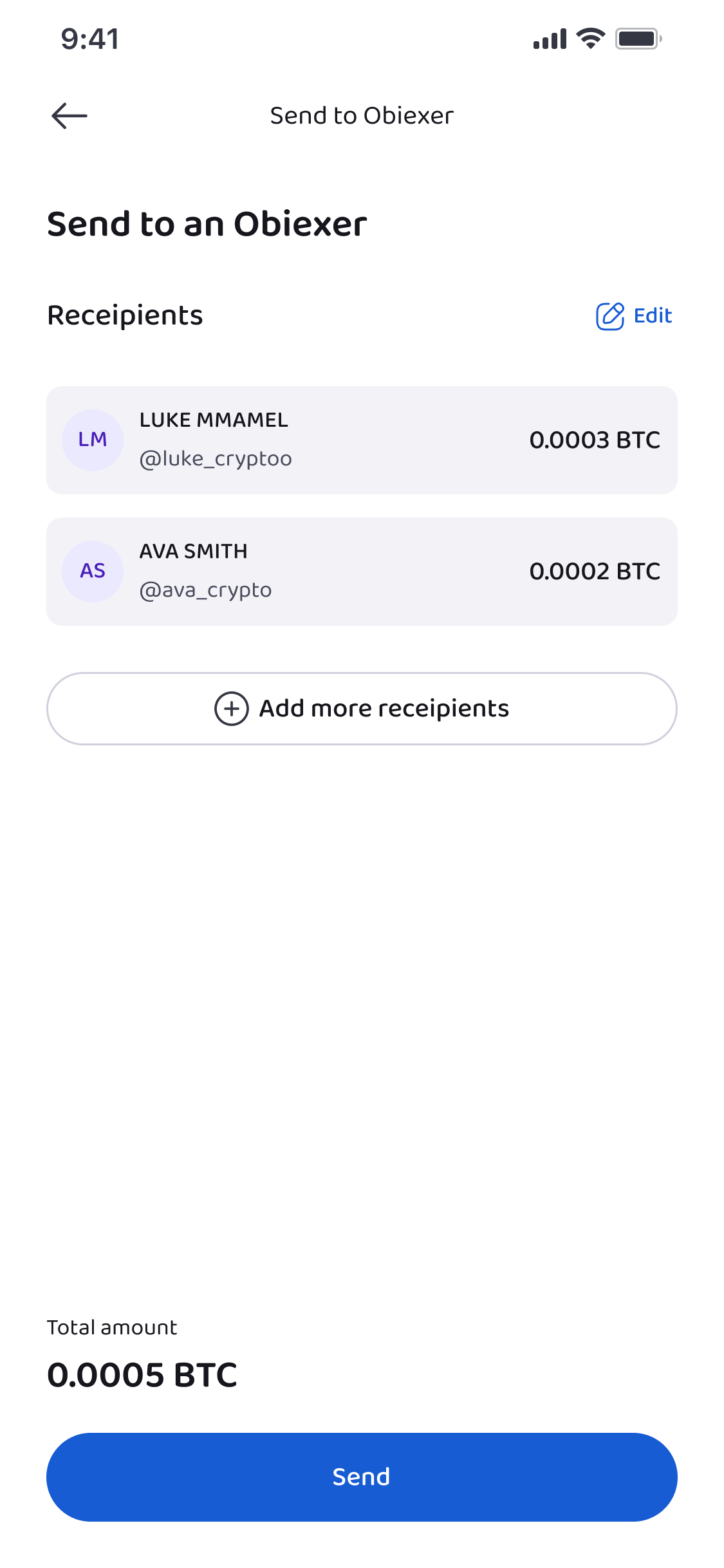
- After entering the details, review the transaction and confirm it.
- Just like with other withdrawals, you will need to authenticate the transaction using your PIN or 2FA.
- Once confirmed, the BTC will be transferred directly to the recipient’s Obiex wallet.
Step 7: What Happens After You Withdraw BTC?
After the withdrawal is confirmed, the BTC will be sent to the destination you specified.
If you used onchain withdrawal, the transaction will be processed on the Bitcoin blockchain. The recipient will receive the funds once the network confirms the transaction.
If you used username transfer, the funds will appear in the recipient’s Obiex wallet almost immediately.
You can always check your transaction history in the wallet section to track the status of the withdrawal.
Ready to start depositing or withdrawing BTC on Obiex?
👉 Log in to your Obiex account today and move your BTC in just a few simple steps.
Frequently Asked Questions (FAQs)
1. How do I find my BTC deposit address on Obiex?
Go to Wallet, tap Deposit, select On-Chain Deposit, and choose BTC. Your BTC deposit address and QR code will appear, which you can copy or share.
2. How long does it take for a BTC deposit to appear in my Obiex wallet?
BTC deposits usually appear after the blockchain confirms the transaction. The time may vary depending on network activity.
3. Can I deposit BTC from another exchange to Obiex?
Yes. You can send BTC from another exchange or crypto wallet to your Obiex wallet using the on-chain deposit option.
4. What is the difference between username transfer and onchain transfer?
A username transfer is a direct transfer between Obiex users, while an onchain transfer uses the blockchain to send funds between different wallets or exchanges.
5. Can I withdraw BTC to any crypto wallet?
Yes. As long as the wallet supports Bitcoin and the correct network is used.
6. Is there a minimum BTC withdrawal amount on Obiex?
Minimum withdrawal amounts may depend on network requirements and platform settings.
7. Do I need to complete verification before withdrawing BTC?
Some withdrawal features may require basic profile completion or security verification.
8. What happens if I send BTC to the wrong address?
Crypto transactions are usually irreversible, so it is very important to check the wallet address before confirming a transaction.
9. Can I send BTC to multiple Obiex users at once?
Yes. The Obiex username transfer feature allows you to send BTC to multiple usernames.
10. Why do I need to confirm withdrawals with PIN or 2FA?
PIN and Two-Factor Authentication (2FA) add an extra layer of security to protect your account and prevent unauthorised withdrawals.
Disclaimer: This article was written to provide guidance and understanding. It is not an exhaustive article and should not be taken as financial advice. Obiex will not be held liable for your investment decisions.